PixExact logo
AI Image Generator FREEMIUM from $11/mo

PixExact

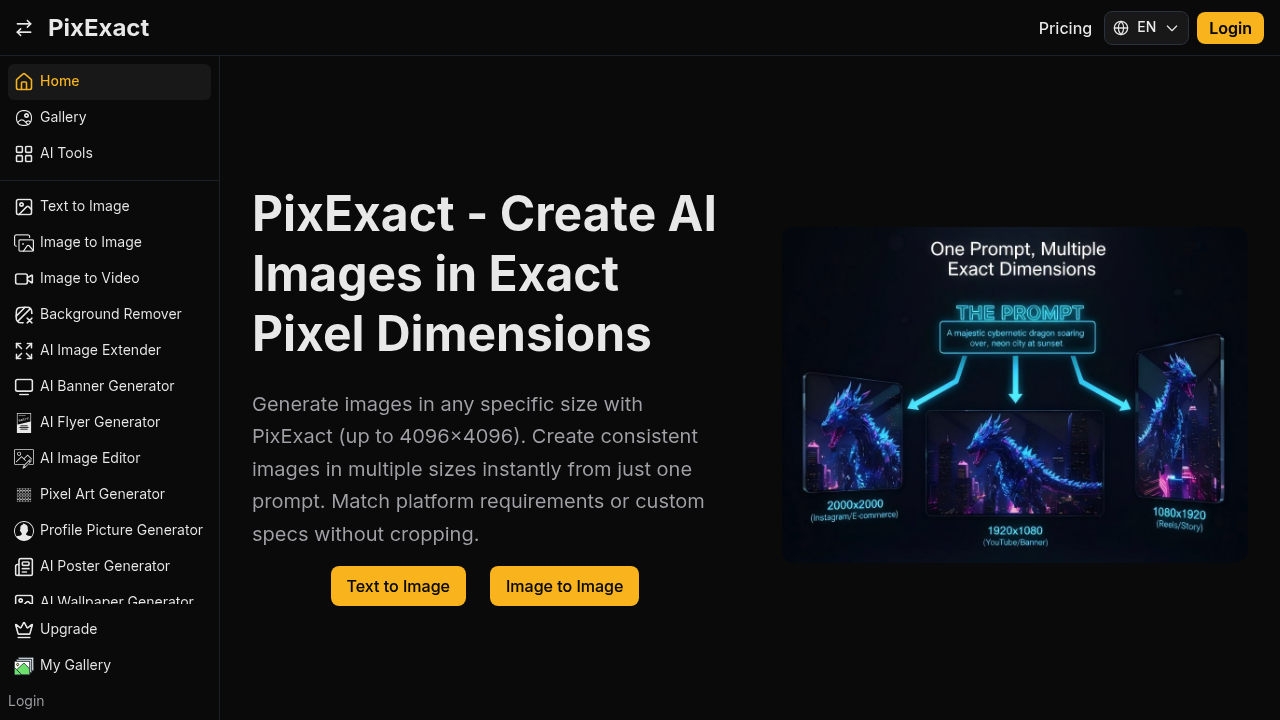
Opening PixExact drops you into a familiar image generator interface with one crucial difference: two input boxes sit above the prompt field asking for exact width and height in pixels

Type 1080 and 1920, write a prompt about a neon cityscape at dusk, and the software generates an image in precisely those dimensions. No aspect ratio selection followed by cropping. No resizing afterwards. The output…

PixExact screenshot

Opening PixExact drops you into a familiar image generator interface with one crucial difference: two input boxes sit above the prompt field asking for exact width and height in pixels. Type 1080 and 1920, write a prompt about a neon cityscape at dusk, and the software generates an image in precisely those dimensions. No aspect ratio selection followed by cropping. No resizing afterwards. The output matches your specs exactly.

The multi-size generation feature shows where this gets truly useful. Enter your prompt once, then select multiple dimensions from presets like 1080x1080, 1200x628, and 1920x1080. Hit generate and you'll get the same subject rendered consistently across all three sizes, maintaining the same style and composition. For social media managers juggling Instagram squares, Facebook link previews, and YouTube thumbnails, this saves the tedious work of regenerating or manually adapting images for each platform.

The interface supports dimensions up to 4096x4096 pixels. Custom sizes work fine. You can also pick from common presets covering everything from standard HD to 4K displays to specific social media requirements. Each generation costs 5 credits from your balance, and you can request between one and four variations per prompt.

Beyond basic generation, the software bundles in background removal, image extension, and various specialized generators for banners, flyers, posters, and pixel art. The image to image feature permits you upload a reference and generate variations. Image to prompt attempts to reverse engineer prompts from existing images. Seed control appears if you want to reproduce specific results.

The friction shows up in the credit system. No obvious way to earn credits through free use. Features occasionally hit upgrade walls without clear explanation of what's locked. The interface does not explain how many credits you start with or how quickly you'll burn through them with multi-size generations.

Web designers building mockups at exact breakpoint dimensions benefit most. E-commerce sellers needing product images in marketplace-specific sizes avoid the crop-and-pray approach. App developers creating assets at precise pixel counts for different screen densities skip the manual resizing step. Anyone tired of generating a beautiful image only to realize it's 1024x1024 when you needed 1200x628 benefits from typing the exact numbers upfront. This platform solves a specific problem that most generators ignore by assuming everyone's fine with standard ratios and post-generation adjustments.
PixExact alternatives

See all →

Frequently asked

6 questions
Can I generate images in exact pixel dimensions with PixExact?
You open PixExact and immediately see two input boxes for width and height in pixels above the prompt field. Type the exact dimensions you need like 1200x628 or 1920x1080, enter your prompt, and the software generates images matching those specifications without any cropping or resizing. The tool supports custom dimensions up to 4096x4096 pixels, plus common presets for social media and web use. This sidesteps the usual workflow of picking aspect ratios and manually adjusting outputs later.
How does PixExact generate multiple image sizes at once?
You write your prompt once, then select multiple dimensions from the preset list or add custom sizes. Hit generate and PixExact creates the same subject across all selected dimensions, keeping the style and composition consistent between a 1080x1080 Instagram square, 1200x628 Facebook link preview, and 1920x1080 YouTube thumbnail. Each generation costs 5 credits regardless of how many sizes you request. The interface lets you pick between one and four variations per generation, so you can get multiple takes on the same multi-size batch.
Is PixExact free to use?
PixExact operates on a credit system where each generation costs 5 credits, but the interface doesn't clearly explain how many credits you start with or how to earn more through free use. Some features hit upgrade walls without specifying what's locked behind payment. The platform labels itself as freemium, suggesting limited free access exists, but you'll likely burn through initial credits quickly if you're generating multiple sizes or variations. The friction around credit transparency makes it hard to gauge how much free usage you actually get.
What image sizes does PixExact support?
PixExact handles any custom dimensions up to 4096x4096 pixels through manual width and height input. Common presets include 1080x1080 for Instagram, 1080x1920 for stories, 1920x1080 for YouTube, 1080x1350 for portrait posts, 1280x720 for HD, 1200x628 for Facebook links, 2000x2000 for prints, 1290x2796 for phone wallpapers, 2048x1024 for banners, and 3840x2160 for 4K displays. The maximum size limitation means you can't generate images larger than roughly 16 megapixels, which might constrain large format print work or ultra-high-resolution display needs.
Who should use PixExact instead of other AI image generators?
Web designers building mockups at exact breakpoint dimensions avoid the guesswork of aspect ratios and post-generation cropping. E-commerce sellers needing product images in marketplace-specific pixel requirements skip manual resizing for Amazon, Etsy, or Shopify listings. App developers creating assets at precise dimensions for different screen densities generate icons and splash screens without adjustment. Social media managers juggling platform-specific sizes get consistent images across Instagram, Facebook, YouTube, and Twitter from a single prompt. Anyone frustrated by generating beautiful images in standard ratios only to realize they need exact dimensions benefits from typing the numbers upfront.
What other tools does PixExact include besides image generation?
Beyond text to image generation, PixExact bundles background removal, AI image extension for expanding canvas, and specialized generators for banners, flyers, posters, pixel art, profile pictures, wallpapers, and icons. Image to image generation lets you upload references and create variations. Image to prompt attempts reverse engineering prompts from existing images. You also get an image cropper, aspect ratio calculator, and image to video conversion. The platform includes seed control for reproducing specific results and visibility settings to keep generations public or private.

Traffic

Estimated monthly website visits · last 8 months

177.9K visits/mo
Monthly visits
177.9K
↑ 39.9% MoM
Global rank
#171,523
ID #15,184
Category rank
#72
AI Image Generator
177.9K 133.4K 89K 44.5K 35 Dec 2025: 35 visits Dec 2025 Jan 2026: 4.3K visits Jan 2026 Feb 2026: 16K visits Feb 2026 Mar 2026: 28.8K visits Mar 2026 Apr 2026: 67.5K visits Apr 2026 May 2026: 102.3K visits May 2026 Jun 2026: 127.2K visits Jun 2026 Jul 2026: 177.9K visits Jul 2026

Reviews (0)

Write review

No reviews yet. Be the first to share your experience.