
PDF to Video AI logo
AI Video Generator FREEMIUM from $3/mo

PDF to Video AI

PDF to Video is an AI-powered tool that transforms static PDF documents into dynamic explainer videos. Whether it’s a report, presentation, manual, or marketing brochure, the platform brings your cont

Dense PDFs kill engagement. Nobody wants to slog through static documents when attention spans keep shrinking. PDF to Video AI converts those paperweights into animated explainer videos with AI-generated narration. No…

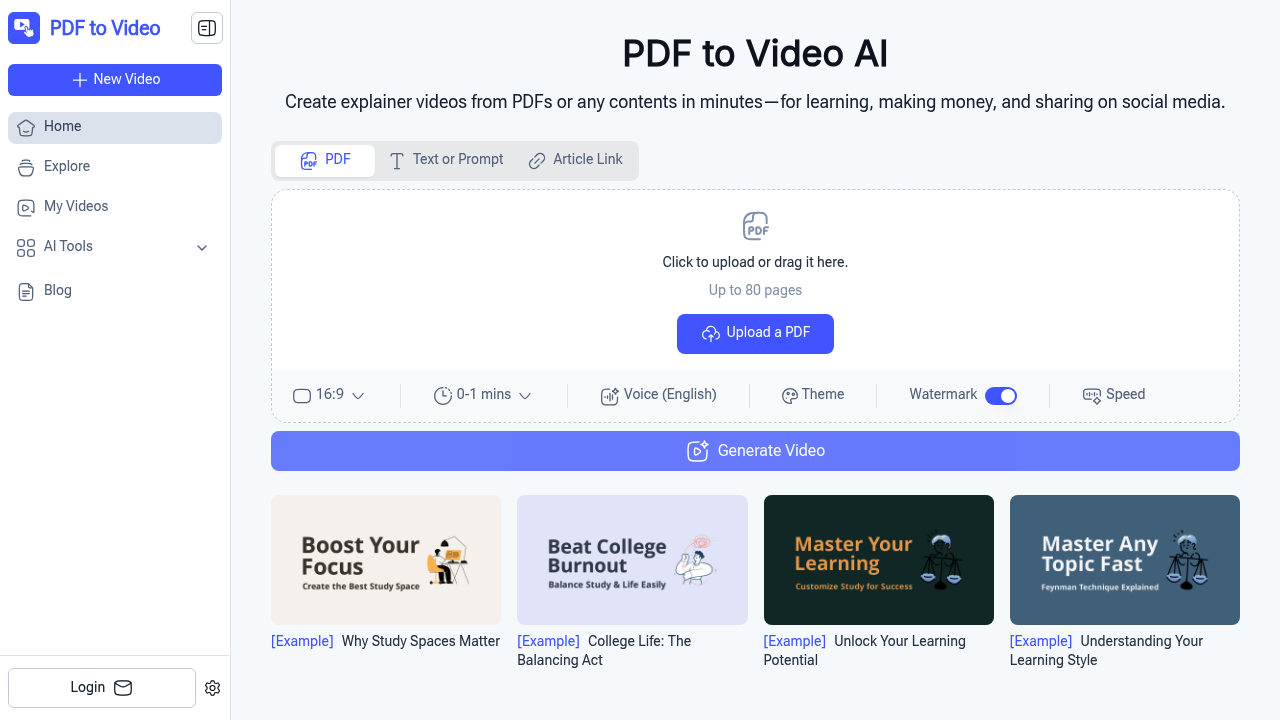
PDF to Video AI screenshot

Dense PDFs kill engagement. Nobody wants to slog through static documents when attention spans keep shrinking. PDF to Video AI converts those paperweights into animated explainer videos with AI-generated narration.

No account creation needed. Upload your PDF and AI analyzes the content automatically. It handles up to 80 pages per document. Spits out videos in 16:9 format. PDF to Video AI also converts URLs. Long text works too. So do prompts.

Picture a corporate trainer prepping quarterly compliance materials. Instead of forcing employees through a 50-page PDF, they convert those guidelines into a one-minute animated video — customizable voiceovers and timing included. Retention rates shoot up.

Theme customization exists. Speed adjustments too. Watermark options are available. PDF to Video AI supports 12 languages but English narration only, which limits global teams. Videos max out at one minute, so forget comprehensive deep-dives.

Teachers converting lesson materials into interactive content? Obvious use case.

PDF to Video AI doesn't require technical skills or video editing experience. Upload, wait, download. Done.

The 80-page limit won't handle massive technical manuals. One-minute duration caps mean you'll need multiple videos for complex topics. Still, for quick explainers from existing documents, it delivers without the usual software learning curve.


PDF to Video AI alternatives

See all →

Frequently asked

7 questions
What's the maximum PDF size that PDF to Video AI can handle?
You can upload PDFs with up to 80 pages. Got a huge technical manual? You'll have to split it up first. The system reads through everything automatically once it's uploaded - no need to pick pages yourself.
Can I make videos longer than one minute with PDF to Video AI?
Nope, one minute's your limit. Perfect for quick explainers, but complex stuff needs multiple videos. You can mess with the speed and timing though (within that minute).
Does the tool support languages other than English for narration?
It'll read PDFs in 12 languages, but the voiceover's always English. So yeah - it can handle your Spanish documents, but you're getting English narration. Kinda limiting for global teams.
Do I need to create an account to use PDF to Video AI?
Not at all. Upload, convert, download - that's it. No sign-ups or account hassles.
What video format does PDF to Video AI output?
Everything comes out in 16:9 widescreen format. The tool handles all that technical stuff automatically - you don't need to worry about aspect ratios or video specs.
Can PDF to Video AI convert web pages and text prompts too?
Yep, it's not just PDFs. Throw in website URLs or chunks of text - the AI analyzes whatever you give it. Same animated explainer style for everything.
How much customization control do I have over the final video?
You can tweak themes, adjust playback speed, and control timing (within that one-minute limit). Watermarks too. But don't expect deep editing - you're basically fine-tuning what the AI creates.

Traffic

Estimated monthly website visits · last 9 months

23K visits/mo
Monthly visits
23K
↑ 28.6% MoM
Global rank
#1,229,629
IN #183,262
Category rank
#122
AI Video Generator
23K 19.4K 15.7K 12.1K 8.5K Nov 2025: 8.5K visits Nov 2025 Dec 2025: 10.9K visits Dec 2025 Jan 2026: 15.7K visits Jan 2026 Feb 2026: 15.5K visits Feb 2026 Mar 2026: 17.9K visits Mar 2026 Apr 2026: 12.8K visits Apr 2026 May 2026: 16K visits May 2026 Jun 2026: 17.9K visits Jun 2026 Jul 2026: 23K visits Jul 2026

Reviews (0)

Write review

No reviews yet. Be the first to share your experience.