
MailMaestro logo

MailMaestro

Email eats hours

38 views
MailMaestro screenshot

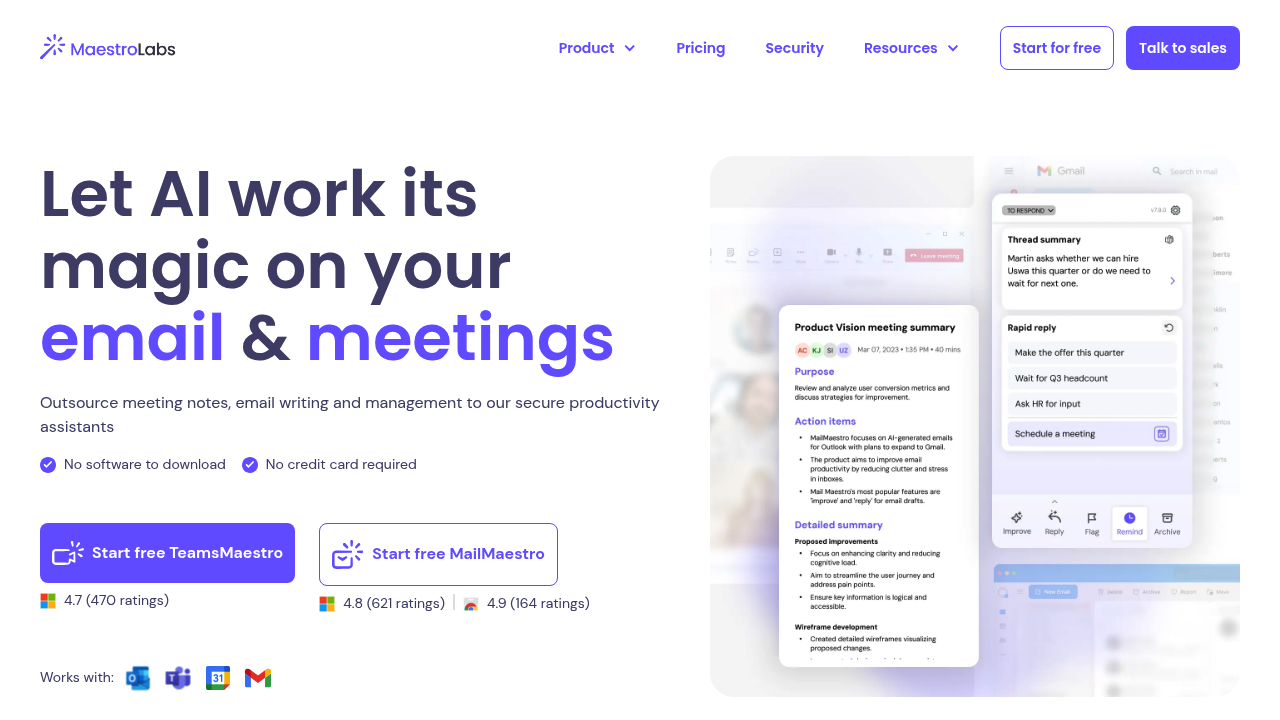
Email eats hours. MailMaestro lives inside Outlook and Gmail to fix that—no bouncing between browser tabs.

You get three distinct draft options every time you need to respond. Type a quick instruction. Get choices that differ in tone and approach. Most email assistants spit out one draft and call it done. Three versions mean you pick what fits. No editing from scratch. No rerolling until something works.

It handles 20+ languages. You adjust tone and length before generating anything. The sidebar placement matters more than it sounds like it should. You stay in your actual inbox while the AI does its thing. No context switching. You knock out responses faster.

MailMaestro summarizes long threads beyond drafting. It pulls out action items with deadlines. Smart labels and filters automatically sort incoming mail by priority and intent. That inbox triage alone supposedly saves two hours daily if your email volume runs high. Magic templates handle repetitive messages. Keyword shortcuts drop in predefined data blocks.

The security setup includes encryption. Enterprise clients get optional zero-day data retention. PII obfuscation is available too. Teams managing high email volumes will get the most out of it. Solo freelancers might find it overkill—unless client communication dominates their day.

The rating sits at 4.8 from over 600 reviews. The company claims 300,000+ teams use it.

Frequently asked

7 questions
How much does MailMaestro cost?
MailMaestro doesn't publicly list their pricing on their main materials. You'll need to contact them directly or check their website for current plan details. They're marketed toward teams and professionals who handle high email volumes, so it's likely priced for business use rather than casual users.
Does MailMaestro work with Gmail and Outlook?
Yes, it works with both Gmail and Microsoft Outlook. It integrates directly into your email client's sidebar, so you don't have to switch tabs or open separate tools. It also works with Microsoft 365 if that's part of your setup.
How does MailMaestro generate email drafts?
You type a short instruction about what you need to say, and it generates three different draft options instead of just one. Each version varies in tone and approach, so you can pick whichever fits best without starting from scratch. You can adjust the tone and length before generating anything.
Can MailMaestro help me organize my inbox automatically?
Yeah, it uses smart labels and filters to automatically tag emails by priority and intent as they come in. It also detects action items and deadlines from your messages and can set up automatic reminders. The company claims this inbox triage can save up to two hours daily if you're drowning in email.
What languages does MailMaestro support?
It supports over 20 languages for drafting and responding to emails. That's handy if you're working with international clients or teams where English isn't everyone's first language.
Is MailMaestro secure enough for business email?
It includes enterprise-grade security with encryption both in transit and at rest. Enterprise clients can opt for zero-day data retention, meaning your data isn't stored at all, plus PII obfuscation features. Those security options make it viable for companies handling sensitive communications.
Who should actually use MailMaestro?
It's best for teams and professionals who spend significant time on email—think client-facing roles, sales, support, or anyone managing dozens of messages daily. If you only get a handful of emails per day, it's probably overkill. But if email dominates your workday, the time savings add up quickly.

Reviews (0)

No reviews yet. Be the first to share your experience.

Similar tools

See all →