Keepy AI appears to be discontinued. Its website has been unreachable across our last three checks. See similar tools below for alternatives.
Keepy AI logo

Keepy AI

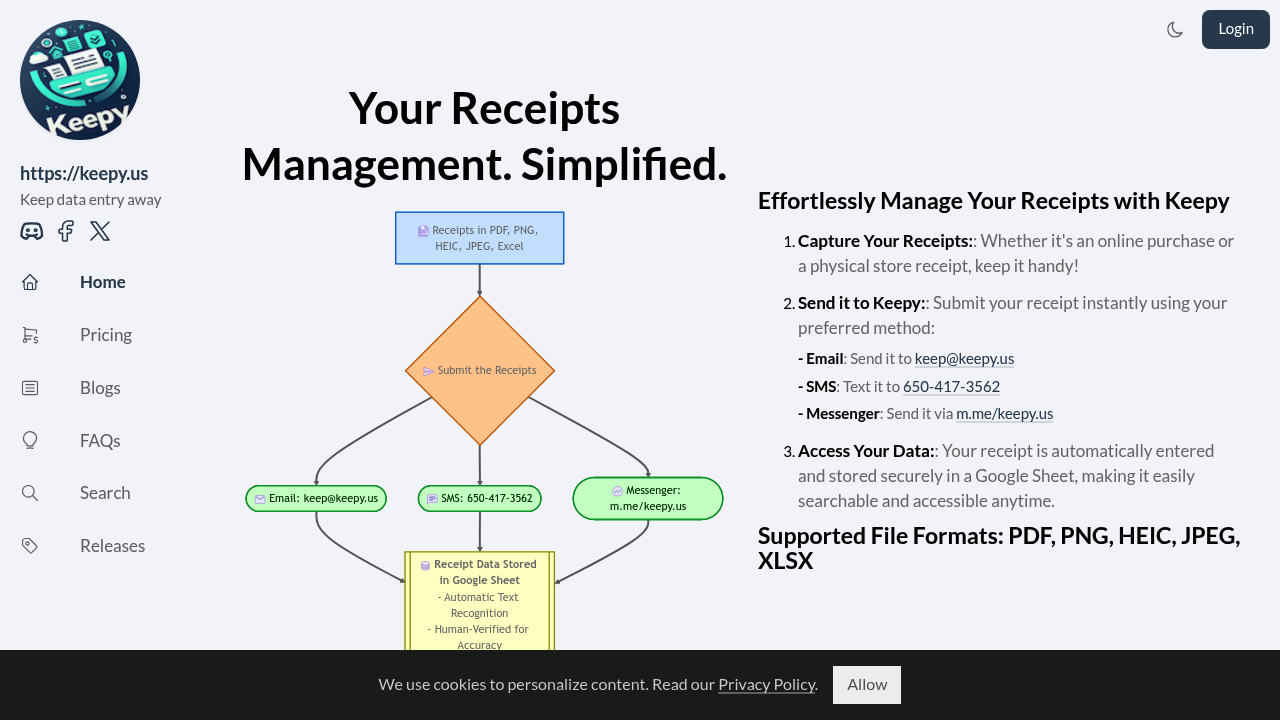
Receipt data flows into Keepy three ways

Email at [email protected]. SMS to 650-417-3562. Facebook Messenger. You snap a photo of your restaurant receipt after a client dinner and text it over. Keepy's AI extracts the merchant name, date, amount, and other key…

Keepy AI screenshot

Receipt data flows into Keepy three ways. Email at [email protected]. SMS to 650-417-3562. Facebook Messenger. You snap a photo of your restaurant receipt after a client dinner and text it over. Keepy's AI extracts the merchant name, date, amount, and other key details.

Human verification follows the automated extraction. This dual approach catches errors that pure AI systems miss — though it likely adds processing time compared to instant automated tools.

Everything lands in a Google Sheet that you control. The data stays organized and audit-ready for tax season. Small business owners juggling expense reports won't have to manually type receipt details into spreadsheets anymore.

Keepy accepts PDF, PNG, HEIC, JPEG, and XLSX files. Tax software imports work smoothly since the data exports in standard formats. No per-receipt fees. The flat-rate pricing model avoids those charges that other services hit you with.

Restaurant managers tracking daily vendor receipts can build a reliable expense database without hiring additional bookkeeping staff. It's a budget-friendly alternative to enterprise accounting software that costs thousands annually. The Google Sheets integration means you don't need to learn new software or migrate existing workflows.

Frequently asked

7 questions
How accurate is Keepy AI's receipt extraction compared to other tools?
Keepy AI's got this dual thing going -- automated AI does the first pass, then humans double-check everything. That catches mistakes pure AI systems miss. Way more accurate than fully automated tools, but yeah, it takes longer since real people review each receipt before your data hits the spreadsheet.
Can I send receipts to Keepy through WhatsApp or other messaging apps?
Nope. Keepy only takes receipts three ways: email to [email protected], SMS to 650-417-3562, or Facebook Messenger. WhatsApp's not supported -- neither are other messaging platforms.
What happens if I accidentally send a non-receipt document to Keepy AI?
The system'll accept PDF, PNG, HEIC, JPEG, and XLSX files -- so it processes whatever you throw at it. But since Keepy's built for receipt data, sending invoices or contracts probably won't give you useful results. The AI hunts for merchant names, dates, and amounts that look like receipts.
How long does it take for receipts to appear in my Google Sheet after sending them?
It's not instant because humans verify everything after the AI does its thing. This dual review takes longer than automated-only tools (though Keepy doesn't give exact timeframes). The human verification step -- that's what makes their extraction more accurate but slower.
Can I connect Keepy to accounting software like QuickBooks instead of Google Sheets?
Keepy only connects directly to Google Sheets that you control. The data exports in standard formats that work with tax software imports though. You'd have to manually export from your Google Sheet and import into QuickBooks or whatever accounting platform you're using.
Does Keepy AI charge per receipt or use subscription pricing?
Keepy uses flat-rate pricing -- no per-receipt fees. This dodges those charges other receipt processing services hit you with when you send tons of receipts. They don't specify exact pricing, but it's positioned as way cheaper than enterprise accounting software that costs thousands yearly.
What specific data fields does Keepy extract from restaurant and vendor receipts?
Keepy's AI pulls merchant name, date, amount, and other key details from receipts. Works really well for restaurant receipts (like after client dinners) and daily vendor receipts. The extracted data lands in your Google Sheet -- organized and audit-ready for tax season.

Traffic

Estimated monthly website visits · last 0 months

Not enough historical data for a chart yet.

Reviews (0)

Write review

No reviews yet. Be the first to share your experience.