ImgGood AI | Poster Generator appears to be discontinued. Its website has been unreachable across our last three checks. See similar tools below for alternatives.
ImgGood AI | Poster Generator logo
AI Image Generator FREEMIUM from $7/mo

ImgGood AI | Poster Generator

This tool transforms poster creation from a design project into a text-input task

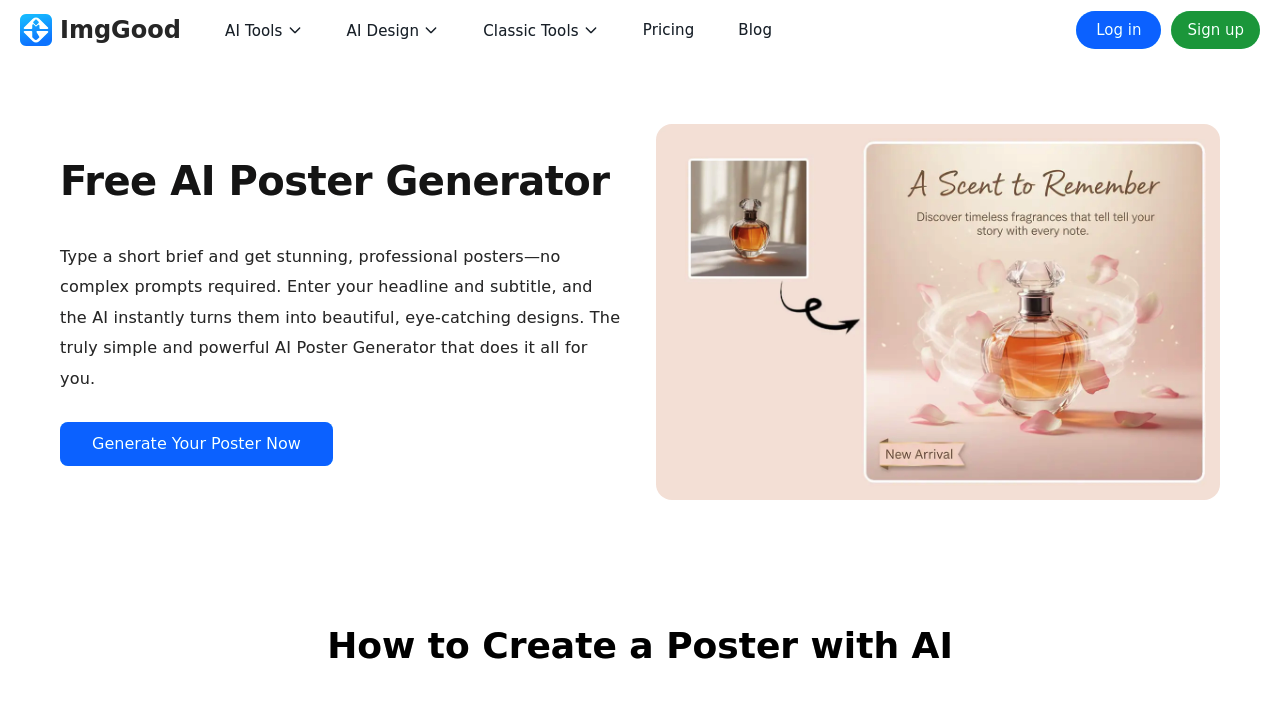
You upload a product photo or storefront image, type a headline and subtitle, add your brand name and contact details, then the system handles layout composition and color coordination automatically. No prompt…

ImgGood AI | Poster Generator screenshot

This tool transforms poster creation from a design project into a text-input task. You upload a product photo or storefront image, type a headline and subtitle, add your brand name and contact details, then the system handles layout composition and color coordination automatically. No prompt engineering required. No design background needed.

The core poster generator consumes 3-8 credits per creation depending on complexity. It optimizes output dimensions for social platforms like Instagram and TikTok, so promotional graphics fit feed requirements without manual resizing. Local businesses get targeted templates: shop promotion posters, store sale announcements, restaurant menu boards. The system reads your uploaded image and structures text placement around visual focal points rather than forcing you into preset templates.

Beyond poster generation, this service bundles 22 additional image manipulation tools under the same credit system. Background Remover strips subjects from their surroundings. Image Upscaler increases resolution for print applications, though free users only see previews. Object Remover erases unwanted elements from photos. The Colorize Photo feature restores color to black-and-white images for 0-8 credits depending on image characteristics. Face Swap costs 1 credit. Hairstyle Changer and Hair Color Changer each consume 2 credits. Image Enhancer applies quality improvements for 2 credits per use.

The AI Image Generator produces original visuals from text descriptions at 1-3 credits each. AI Product Photography stages items in professional settings for 3-8 credits. Photo to Sketch converts images to line drawings for 2 credits. AI Style Transfer applies artistic filters. The Image Extender expands canvas boundaries by generating contextually appropriate fill content for 2 credits.

Bulk editing capabilities separate free and paid tiers sharply. Free accounts process 2 images simultaneously. Pro subscriptions handle 30 images at once through bulk crop, bulk resize, and bulk background removal workflows. This matters for businesses cycling through seasonal campaigns or multi-product catalogs.

The Pro-Monthly plan costs $6.99 and delivers 300 credits monthly with HD export quality. Pro-Yearly runs $59.88, saving $24 compared to 12 monthly payments while maintaining the same 300-credit allocation. Credits do not roll over, so unused balances vanish at renewal. Free accounts get limited credits with no specific number disclosed, non-HD exports only, and daily usage caps on AI features that reset every 24 hours.

Cafés promoting weekend specials fit the target profile. Salons advertising seasonal services. Neighborhood stores announcing inventory arrivals. Restaurant managers updating menu boards. Social media creators producing feed content without Photoshop subscriptions. The interface assumes zero design vocabulary. You won't configure kerning or adjust leading. The system interprets your text inputs and image content to make those decisions.

Limitations concentrate on the free tier. HD quality remains locked behind the paywall, so free exports display lower resolution unsuitable for large-format printing. The 2-image bulk edit restriction slows batch workflows. Daily usage limits on AI features could block afternoon work if you exhaust allowances during morning sessions. Image Upscaler shows only previews without processing capability. Pro users face one constraint: the monthly credit cap of 300, which depending on feature usage patterns might require rationing across poster generation (3-8 credits), product photography (3-8 credits), and image generation (1-3 credits) tasks.

The Mood Poster Maker subfeature converts personal photos into stylized poster formats, expanding use cases beyond commercial applications into personal projects and gift creation.

Frequently asked

7 questions
How many credits does ImgGood AI use per poster?
The AI Poster Generator consumes 3-8 credits per poster depending on the complexity of your design and the processing required. Simple posters with basic layouts sit at the lower end while more complex compositions with intricate image integration use the full 8 credits. Pro plan subscribers get 300 credits monthly, which translates to roughly 37-100 posters if you use only the poster generator. Other features drain from the same credit pool, so creating AI product photography shots at 3-8 credits each or generating images at 1-3 credits reduces your poster capacity. Credits expire at the end of each billing period without rollover.
Can I use ImgGood AI for free without a subscription?
Free accounts access all features but face significant constraints that limit practical use for business applications. You get an undisclosed amount of limited credits each month with daily usage caps that reset every 24 hours, meaning heavy usage in one session blocks further work until the next day. Exports come in non-HD quality only, making them unsuitable for printing or professional displays where resolution matters. Bulk editing processes just 2 images simultaneously compared to 30 for Pro users, turning batch jobs into tedious manual repetition. The Image Upscaler shows only previews without actually processing your files, essentially making that feature unavailable.
What's the difference between ImgGood AI monthly and yearly plans?
Both Pro-Monthly at $6.99 and Pro-Yearly at $59.88 deliver identical features: 300 credits monthly, HD export quality, bulk editing for 30 images at once, and unrestricted access to all 23 tools. The yearly plan saves $24 compared to paying monthly for 12 months, working out to roughly $4.99 per month when averaged. Credits still operate on a monthly allocation schedule even with the yearly subscription, so you receive 300 credits each month rather than 3,600 upfront. Unused credits from any month disappear at renewal regardless of which billing cycle you choose.
Does ImgGood AI require design skills or complex prompts?
The system eliminates design knowledge requirements by handling layout composition, color harmony, and text placement automatically based on your uploaded image and text inputs. You simply upload a product photo or storefront image, type a headline and subtitle, enter brand name and contact details, then the AI structures everything without template selection or manual positioning. There's no prompt engineering involved like other AI image tools that require detailed descriptions of lighting, composition, and style parameters. This design approach targets local business owners, social media creators, and anyone producing promotional content without Photoshop experience or graphic design vocabulary.
What happens to unused credits in ImgGood AI?
Unused member credits disappear completely at the end of each billing period without rolling over to the next month. If you use only 150 of your 300 monthly Pro credits, the remaining 150 vanish at renewal rather than accumulating to give you 450 the following month. This expiration policy affects budgeting for businesses with fluctuating promotional needs, since quiet months waste paid credits while busy periods might require rationing features. The credit consumption varies widely by tool, from 1 credit for Face Swap to 3-8 credits for poster generation or product photography, making monthly usage unpredictable if you mix different features.
Can ImgGood AI create posters for Instagram and TikTok?
The poster generator automatically optimizes output dimensions for social media platforms including Instagram and TikTok, eliminating manual resizing work to meet feed specifications. After the AI designs your poster from uploaded images and text inputs, it formats the final output to match platform requirements so graphics display properly without cropping or distortion. This social media optimization works alongside the tool's local business focus, letting cafés, salons, and restaurants create promotional content that posts directly to their accounts. The Mood Poster Maker subfeature extends this capability to personal photos, converting them into stylized poster formats suitable for social sharing beyond commercial applications.
What image editing tools come with ImgGood AI besides poster creation?
The service bundles 22 additional image manipulation tools that share the same monthly credit allocation as poster generation. Background Remover, Object Remover, and bulk editing features handle common photo cleanup tasks. Face Swap costs 1 credit while Hairstyle Changer, Hair Color Changer, Image Enhancer, Image Extender, and Photo to Sketch each consume 2 credits. AI Product Photography stages items in professional settings for 3-8 credits, competing directly with the poster generator for your monthly budget. Colorize Photo restores color to black-and-white images at variable costs from 0-8 credits depending on image characteristics, and the AI Image Generator produces original visuals from text descriptions for 1-3 credits each.

Traffic

Estimated monthly website visits · last 7 months

1.1K visits/mo
Monthly visits
1.1K
↑ 313.6% MoM
Global rank
#15,413,821
Category rank
#155
AI Image Generator
3.5K 2.7K 1.8K 928 56 Jan 2026: 410 visits Jan 2026 Feb 2026: 278 visits Feb 2026 Mar 2026: 3.5K visits Mar 2026 Apr 2026: 56 visits Apr 2026 May 2026: 149 visits May 2026 Jun 2026: 273 visits Jun 2026 Jul 2026: 1.1K visits Jul 2026

Reviews (0)

Write review

No reviews yet. Be the first to share your experience.