
Hireable Headshots logo
AI Headshot Generator FREEMIUM from $192/mo

Hireable Headshots

A consultant updates her LinkedIn profile before pitching to enterprise clients

She's got plenty of casual photos but nothing that looks credible for a $200k contract negotiation. Studio sessions cost $300 and take two weeks to schedule. She uploads six selfies to Hireable Headshots, picks the…

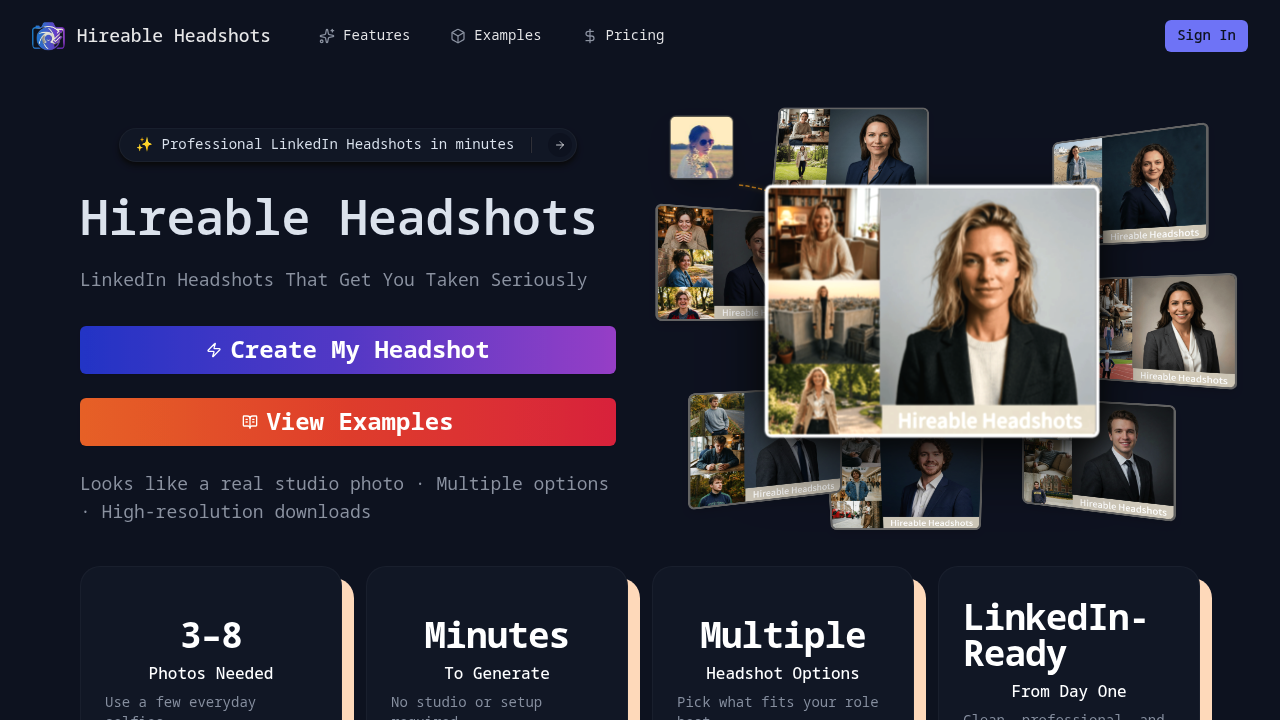
Hireable Headshots screenshot

A consultant updates her LinkedIn profile before pitching to enterprise clients. She's got plenty of casual photos but nothing that looks credible for a $200k contract negotiation. Studio sessions cost $300 and take two weeks to schedule. She uploads six selfies to Hireable Headshots, picks the "confident and leadership-ready" style, and downloads high-resolution professional shots in minutes. The backgrounds look clean, the lighting feels natural, and her facial features stay consistent across variations. She picks one for LinkedIn, another for her email signature, and a third for the proposal deck.

This service turns everyday photos into LinkedIn-appropriate headshots without studio equipment or photographer fees. Users upload 3-8 clear photos, then the system generates professional images with natural retouching that keeps real skin texture instead of smoothing everything into plastic. Three career style options let people match their role requirements. Neutral corporate works for finance and law. Friendly and approachable fits sales and HR. Confident and leadership-ready suits executives and founders. The generation process takes minutes, not days. All outputs come in high resolution suitable for resumes, Slack profiles, Teams accounts, company directories, and personal websites.

A founder launching a startup needs headshots for his team page and investor materials. He's got engineers who hate being photographed and a remote team scattered across time zones. Coordinating a studio session would cost thousands and waste a week. He sends the link to his team. Each person uploads their own photos and generates headshots that match the company's professional tone. The identity consistency matters here because the AI doesn't turn people into generic corporate faces.

But limitations exist. The 10MB file upload size means large, uncompressed photos won't work. Users need at least three clear photos where their face is visible. Bad lighting or blurry selfies produce weak results. This service is designed specifically for LinkedIn-style professional photos, not artistic portraits or glamour shots. Someone wanting creative photography or editorial looks won't find those options. The career style selection is narrow by design, which helps maintain professional standards but limits creative expression.

The pricing structure runs on credits. Generation costs 10 credits. The Starter plan at $191.88 per year includes 6,000 credits that generate up to 600 photos, plus 50 free photos monthly. Standard costs $239.88 yearly with 18,000 credits for up to 1,800 photos and 150 monthly free images. Premium runs $479.54 annually with 40,800 credits generating up to 4,080 photos and 340 monthly free shots. Credits expire after one year. That math works for consultants who need occasional headshot refreshes or small teams sharing one account, but solo professionals updating their photo once a year might find the Starter plan excessive.

A job seeker applying to corporate roles needs a credible LinkedIn photo. Studio sessions feel like overkill for someone between jobs. Spending $200 on professional photography before landing an interview doesn't make financial sense. Uploading selfies and generating professional options for under $200 annually fits the budget. The natural retouching avoids the obviously AI-generated look that makes recruiters skeptical.

This doesn't fit creative professionals who want artistic control or specific lighting setups. Fashion photographers, actors needing comp cards, or artists building portfolios need more than three career style presets. People who already have recent professional headshots don't need another subscription. This service solves the LinkedIn credibility problem for everyone else.


Hireable Headshots alternatives

See all →

Frequently asked

7 questions
How many photos do you need to upload to generate AI headshots?
Users need to upload 3-8 clear photos showing their face. A marketing manager switching jobs would grab six selfies from different angles with decent lighting, upload them, and get professional headshots in minutes. The system uses these photos to maintain identity consistency so the generated headshots actually look like the person instead of a generic AI face. Blurry photos or images where the face isn't clearly visible produce weak results, so a remote worker taking quick phone photos in natural window light gets better outputs than someone uploading dark, grainy shots from a basement office.
Can you use Hireable Headshots for free?
No free tier exists, but the Starter plan at $191.88 per year includes 50 free photos monthly along with 6,000 credits valid for one year. A freelance designer building her portfolio would pay upfront for the annual subscription, then generate headshots without worrying about per-use charges for the first 50 photos each month. Credits cost 10 per generation, so that initial 6,000 credit bundle generates up to 600 additional photos beyond the monthly free allocation. Someone needing one headshot refresh annually might find this pricing excessive since credits expire after 12 months whether used or not.
What's the difference between the three career style options?
Neutral corporate produces headshots for finance, legal, and traditional business roles where conservative appearance matters. A law firm associate preparing partnership materials would pick this style to match firm directory standards. Friendly and approachable works for sales reps, HR professionals, and customer-facing roles where warmth matters more than authority. Confident and leadership-ready suits executives, founders, and consultants who need to project decision-making capability in investor decks or client proposals. The narrow selection maintains LinkedIn professional standards but won't help a creative director wanting editorial looks or artistic lighting setups.
How long does it take to generate professional headshots?
Generation takes minutes after uploading 3-8 photos. A startup founder preparing for a press announcement would upload selfies during lunch, pick the confident leadership style, and download high-resolution shots before his afternoon investor call. This speed beats studio photography that requires scheduling appointments two weeks out, traveling to a location, and waiting days for edited proofs. But rushed uploads with poor lighting or blurry phone photos still produce weak results even though the processing is fast, so a consultant grabbing random screenshots from video calls won't match the quality of someone who takes ten minutes to capture clear photos in decent light.
Does Hireable Headshots work for team photos or group shots?
This service is designed specifically for individual LinkedIn-style headshots, not team photography or group images. A remote startup with ten employees would have each person upload their own 3-8 photos separately and generate individual professional headshots for the company website team page. The 10-credit-per-generation cost means a team sharing one Premium account at $479.54 annually could generate 4,080 total photos across all members, which works for small teams doing occasional headshot refreshes. But someone needing coordinated group photos with matching backgrounds and lighting for a corporate brochure would need actual photography instead of individual AI-generated shots.
Can you edit or customize the generated headshots after creation?
The tool generates finished headshots in preset career styles without post-generation editing options. A sales director who wants to adjust background colors, change lighting angles, or add creative filters won't find those controls. Users pick one of three career style options before generation, then download high-resolution images that preserve natural skin texture and facial features. Someone dissatisfied with results would need to upload different source photos or select another style preset and generate again using another 10 credits. This works for professionals who need standard LinkedIn headshots matching industry norms, but creative professionals wanting artistic control or specific lighting setups should look elsewhere.
What file size and quality requirements work best for uploads?
Upload files can't exceed 10MB, and photos need clear facial visibility with decent lighting. A consultant preparing materials would check that her phone photos are under 10MB each and show her face clearly without shadows or blur. Large uncompressed images from professional cameras often exceed the limit, so a photographer with 25MB RAW files would need to export compressed versions first. The system produces better results from well-lit selfies taken in natural window light than from dark, grainy photos shot in poor conditions. Someone uploading six blurry screenshots from Zoom calls will get weaker outputs than a remote worker who spends five minutes taking clear phone photos against a plain wall.

Traffic

Estimated monthly website visits · last 0 months

Not enough historical data for a chart yet.

Reviews (0)

Write review

No reviews yet. Be the first to share your experience.