GPTImage.app logo
AI Image Generator FREEMIUM from $10/mo

GPTImage.app

You land on GPTImage

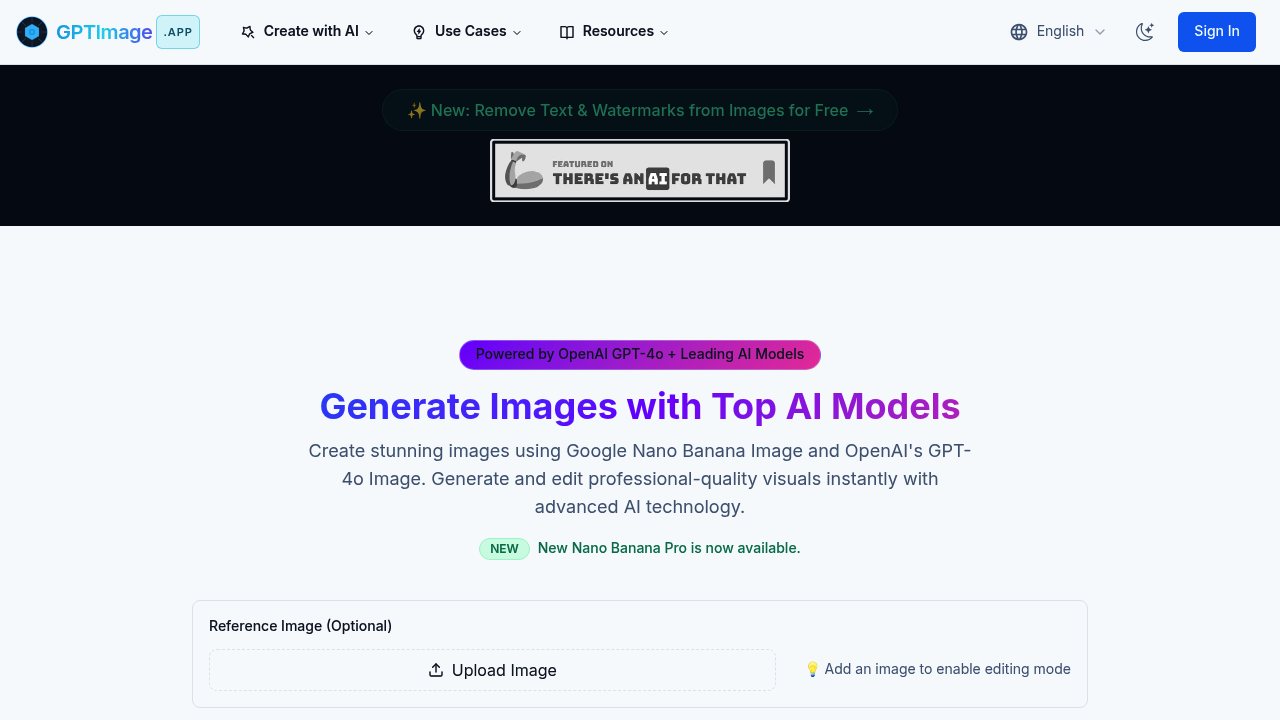
App and immediately choose between five different AI models. GPT-4o Image, DALL-E 3, Flux Pro, Kling AI, and Google Nano Banana Pro each sit in their own tabs, ready to generate from the same prompt. Type what you want,…

GPTImage.app screenshot

You land on GPTImage.app and immediately choose between five different AI models. GPT-4o Image, DALL-E 3, Flux Pro, Kling AI, and Google Nano Banana Pro each sit in their own tabs, ready to generate from the same prompt. Type what you want, hit generate, and watch a progress bar crawl across the screen while the model works.

The interface handles both creation and editing. Upload a reference image to tweak existing visuals rather than starting from scratch. You'll find controls for aspect ratio with 1:1 set as default, quality adjustment sitting at 80%, and a negative prompt field where you can tell the system what to avoid. The output arrives as a PNG.

Two specialized studios branch off from the main generator. The Cinematic Image Generator comes loaded with film-quality lighting presets for dramatic frames and moodboards. The AI Crochet Designer generates actual stitch patterns, not just pictures of yarn.

A public gallery shows what other users have made. You can remove text and watermarks from images using dedicated tools. Real-time progress tracking means you're not staring at a blank screen wondering if anything's happening.

The friction shows up when you're comparing outputs across different models. You'll need to regenerate the same prompt five separate times if you want to see how each AI interprets your request. No side-by-side comparison view exists.

This service targets creators who need professional-quality visuals fast. Designers building moodboards, filmmakers mocking up shots, and even crochet enthusiasts designing patterns all fit the use case. The model variety matters when one AI nails your vision while another completely misses it.
GPTImage.app alternatives

See all →

Frequently asked

7 questions
Can you use GPTImage for free?
The site operates on a freemium model, but the specific limits of what you get without paying aren't documented. You'll need to create an account and start generating to discover where the free tier cuts off. Most AI image generators restrict either the number of generations or access to premium models in their free plans.
What AI models does GPTImage use?
You get access to five different AI models: GPT-4o Image, DALL-E 3, Flux Pro, Kling AI, and Google Nano Banana Pro. Each model lives in its own tab, so you select one before typing your prompt. The catch is you'll regenerate the same prompt separately for each model if you want to compare results.
How do you edit existing images with GPTImage?
Upload a reference image to switch the tool into editing mode instead of pure generation. You can modify existing visuals, remove text from images, or strip out watermarks. The same quality controls and negative prompts work in editing mode as they do for fresh generations.
What's the difference between GPTImage's Cinematic Generator and regular image generation?
The Cinematic Image Generator comes preloaded with film-quality lighting presets designed for dramatic frames and moodboards. You're getting specialized controls for cinematic aesthetics instead of the general-purpose settings in the main generator. It targets filmmakers and designers who need production-quality visual mockups.
Can GPTImage generate crochet patterns?
The AI Crochet Designer studio creates stitch-accurate patterns, not just images of finished projects. You describe what you want and the system generates actual working patterns. This separates it from regular image generators that would only show you pictures of crochet without usable instructions.
What image formats does GPTImage export?
The platform outputs PNG files. You'll find quality adjustment controls that default to 80% and aspect ratio settings starting at 1:1 square. Real-time progress tracking shows while the generation runs, then you download the finished PNG.
Can you compare different AI models side-by-side in GPTImage?
You'll need to generate the same prompt five separate times to see how each model interprets your request. The models sit in individual tabs without a comparison view that shows multiple outputs at once. This makes A/B testing tedious when you're trying to figure out which AI handles your specific style best.

Traffic

Estimated monthly website visits · last 0 months

789 visits/mo
Monthly visits
789

Not enough historical data for a chart yet.

Reviews (0)

Write review

No reviews yet. Be the first to share your experience.