
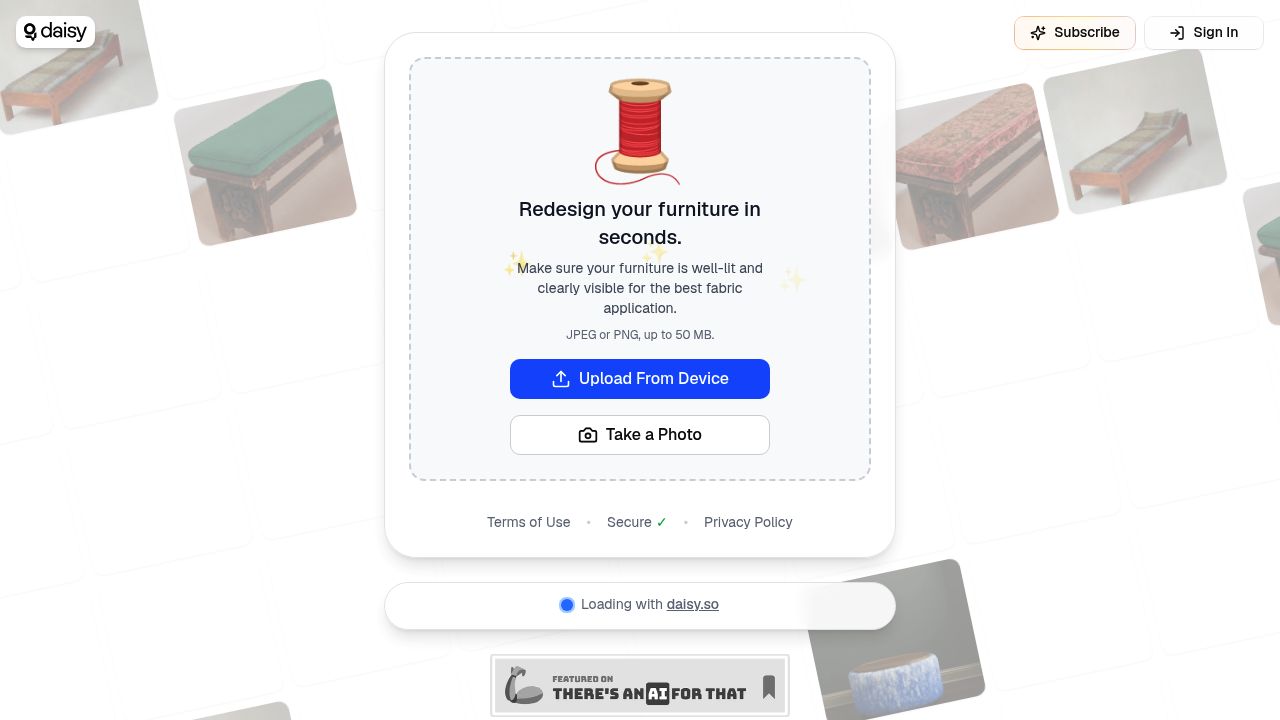
Upload a photo of your couch and Stitchify applies different fabric patterns to it virtually. This feature works through your browser without needing downloads or account setup. You can either upload an existing photo or capture one directly through the interface.
The upload process accepts JPEG or PNG files up to 50 MB. Once you've got your furniture photo loaded, the AI analyzes the piece and lets you experiment with different fabric options. The redesign happens in seconds, showing how various patterns and textures would look on your actual furniture. This beats driving to stores with fabric swatches or trying to imagine how a pattern might work in your space.
Stitchify works best when your furniture's well-lit and clearly visible in the photo. Poor lighting messes with the AI's ability to detect edges and surfaces accurately, which makes the fabric application look off. Dark corners or shadowy photos produce wonky results where the pattern does not follow the furniture's contours properly. You'll waste time re-shooting if your first photo's too dim.
The interface doesn't explain what makes a good photo until after you've uploaded something subpar. No preview or guidance about optimal lighting conditions before you commit to uploading. You're left guessing whether your photo's good enough or if you need to reshoot with better lighting setup.
Over 246,000 people have used the service, suggesting it is found an audience among furniture shoppers and interior design enthusiasts. Stitchify runs on the daisy.so platform, though what that means for features or reliability isn't immediately clear from the interface.
File size limits hit 50 MB maximum. Most phone photos stay well under this, but high-resolution camera shots sometimes bump against the ceiling. Stitchify only handles JPEG and PNG formats, ruling out other image types like HEIC that iPhones default to unless you've changed settings.
The workflow's straightforward enough that you can test multiple fabric options quickly. Upload once, cycle through patterns, see what works. This speed makes it practical for actual decision-making rather than just playing around. You can show options to family members or roommates without committing to physical samples.
No mention of saving your redesigned images or sharing them. Stitchify focuses purely on the visualization moment without obvious ways to preserve or export what you've created. You'd need to screenshot if you wanted to keep comparisons for later.