CosmicUp logo
AI Chatbot FREEMIUM

CosmicUp

A content strategist starts drafting a blog post in one model, switches mid-conversation to a different one for fact-checking, then jumps to another for SEO optimization—all without losing the thre...

Ad of what they're working on. CosmicUp gives access to over 30 chat, image, and audio models through one interface while keeping conversation context intact when switching between them. No message caps. No context…

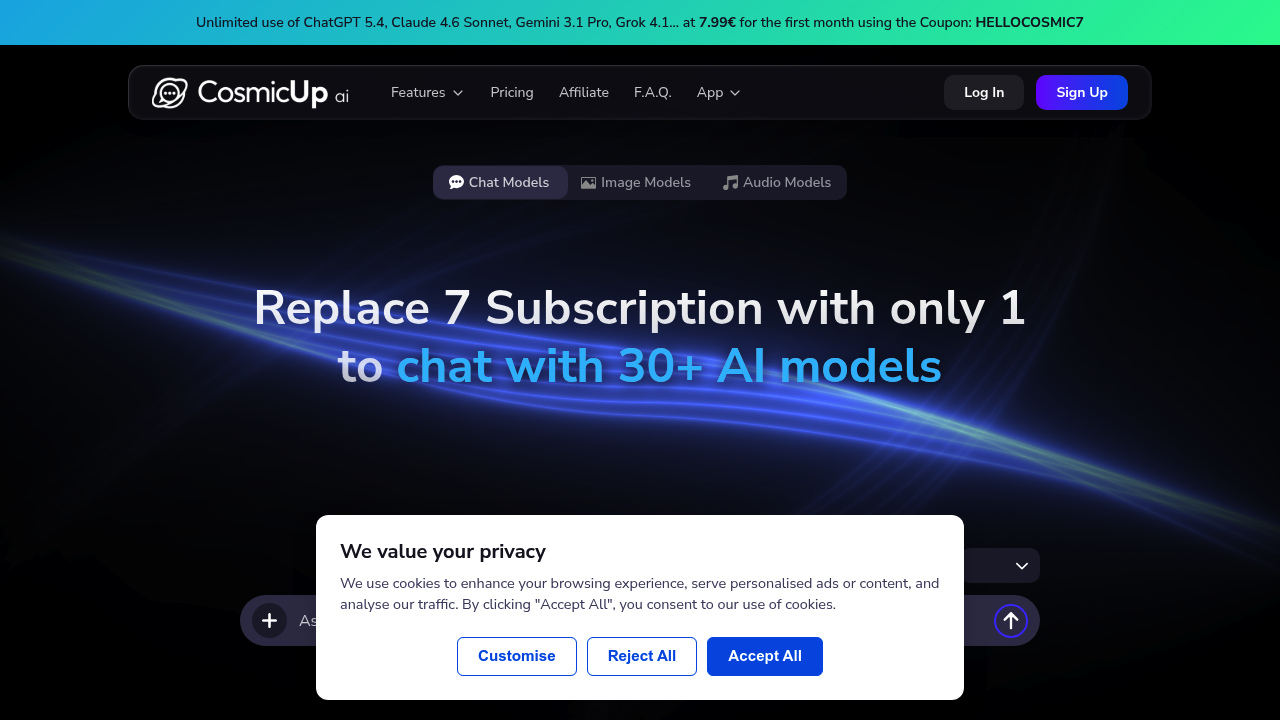
CosmicUp screenshot

A content strategist starts drafting a blog post in one model, switches mid-conversation to a different one for fact-checking, then jumps to another for SEO optimization—all without losing the thread of what they're working on. CosmicUp gives access to over 30 chat, image, and audio models through one interface while keeping conversation context intact when switching between them. No message caps. No context window limits.

The service connects to official API providers, so responses come directly from source rather than through intermediaries. A developer can write Python code with formatting help, then run it automatically without leaving the chat. Upload up to 10 files per message—PDFs, spreadsheets, presentations, images—and the system analyzes them alongside the conversation.

Organization happens through folders and subfolders. Create separate spaces for client projects, personal research, or code repositories. The online search feature pulls from blogs and websites in real time, while Deep Research digs deeper—analyzing over 50 sites to generate a detailed PDF report in fifteen minutes. Customize how models respond through advanced system prompts.

A marketing analyst researches competitor strategies using Deep Research, uploads their own performance data as CSV files, then asks different models to interpret the findings from various angles. The context persists. A technical writer switches from one model's explanation style to another's without re-explaining the product they're documenting. It works across use cases where model-hopping makes sense.

The free plan comes with two image generation models but locks most features. The Plus plan costs €7.99 monthly and opens everything—full model access, code execution, online search, unlimited use. A promotional coupon HELLOCOSMIC7 drops the first month's price. That's cheaper than one standalone subscription to most premium AI services, let alone seven.

The mobile app extends access beyond desktop. 10,000 users are already on board.

Where it falls short: team collaboration features don't exist. No shared workspaces, no role management, no collaborative folders. If three people need coordinated access to the same research or projects, this won't handle it. Browser extensions aren't available either, so workflows stay inside the app rather than embedding into existing tools. API access isn't mentioned, meaning developers can't build their own integrations.

Solo professionals who juggle multiple AI tools will find value here. Teams won't. People who need AI embedded in other software should look elsewhere.


CosmicUp alternatives

See all →

Frequently asked

7 questions
Can you switch between AI models without losing your conversation?
A copywriter drafting product descriptions can start with one model for initial ideas, switch to Claude for refining tone, then jump to Gemini for fact-checking—all while the system remembers what product they're describing and what's already been discussed. The conversation context stays intact across all 30+ models. A researcher comparing economic theories can ask different models to critique the same argument without re-explaining the premise each time. This works because CosmicUp maintains the thread when switching, unlike platforms where each model starts fresh.
Does CosmicUp have a free plan or trial?
The free plan exists but only includes two image generation models with locked features—no chat models, no file uploads, no research tools. There's no free trial for the full platform. A Plus subscription costs €7.99 monthly and unlocks everything: 30+ models, unlimited use, file analysis, code execution, and Deep Research. The coupon HELLOCOSMIC7 reduces the first month's price. Someone wanting to test chat models or document analysis before paying won't get that option.
Can CosmicUp run Python code automatically?
A data analyst writes Python scripts to process CSV files and the system executes them automatically without switching to an external environment. This only works for Plus users—the free plan doesn't include it. A financial modeler can write code to calculate projections, run it, see results, adjust the script, and run again within the same conversation. The AI Code Assistant formats the code properly, then the execution happens in-chat. Developers prototyping small scripts or analysts doing quick data transformations save time by staying in one place.
How does Deep Research work in CosmicUp?
A market researcher investigating customer retention strategies triggers Deep Research, which scans over 50 sites and delivers a comprehensive PDF report in fifteen minutes. This goes beyond the basic online search feature that pulls real-time results from blogs and websites. A graduate student researching renewable energy policies can get synthesized information from dozens of sources formatted as a structured document. The regular search handles quick fact-checking; Deep Research handles thorough investigation. Both run through the same interface, so switching between quick answers and deep dives happens mid-conversation.
Can multiple people share projects or folders in CosmicUp?
A design agency with three strategists working on the same client pitch can't share folders or collaborate inside CosmicUp—no team features exist. Each person maintains separate conversations and research even if they're working toward the same deliverable. A consulting firm where analysts need coordinated access to shared research won't find workspace management or role permissions. The folder system organizes individual work well, but collaboration requires exporting findings and sharing them outside the platform. Solo freelancers juggling multiple clients benefit from the organization; teams coordinating projects don't.
What file types can you upload to CosmicUp?
A legal consultant can upload contracts as PDFs, financial data as XLSX spreadsheets, case summaries as DOC files, and client presentations as PPT—up to 10 files per message. The system also handles CSV, TXT, and PNG formats. A project manager uploads meeting notes, budget sheets, and timeline documents simultaneously, then asks different models to analyze them from various angles without re-uploading. The file analysis works alongside conversation context, so referencing specific documents later in the chat doesn't require clarification about which file you mean.
How much does CosmicUp cost compared to individual AI subscriptions?
A content creator paying for ChatGPT Plus, Claude Pro, and Midjourney separately spends over $50 monthly—CosmicUp costs €7.99 for access to 30+ models including all those services. The pitch is replacing seven subscriptions with one. A developer using multiple coding assistants and research tools consolidates expenses while gaining unlimited use with no message caps. The promotional code HELLOCOSMIC7 lowers the first month further. Someone only needing one specific model regularly won't save money, but anyone rotating between three or more premium AI services cuts costs significantly.

Traffic

Estimated monthly website visits · last 8 months

16.2K visits/mo
Monthly visits
16.2K
↓ 46.9% MoM
Global rank
#1,706,923
IT #67,593
Category rank
#65
AI Chatbot
30.5K 24.3K 18.1K 11.9K 5.7K Dec 2025: 11.6K visits Dec 2025 Jan 2026: 8.8K visits Jan 2026 Feb 2026: 5.7K visits Feb 2026 Mar 2026: 11.8K visits Mar 2026 Apr 2026: 7.5K visits Apr 2026 May 2026: 14.1K visits May 2026 Jun 2026: 30.5K visits Jun 2026 Jul 2026: 16.2K visits Jul 2026

Reviews (0)

Write review

No reviews yet. Be the first to share your experience.