BatchVideo.ai appears to be discontinued. Its website has been unreachable across our last three checks. See similar tools below for alternatives.
BatchVideo.ai logo
AI Commercial Generator PAID from $15/mo

BatchVideo.ai

Mobile access gets zero mention on BatchVideo

Ai's site. That's a problem if you're managing video campaigns on the go. BatchVideo.ai focuses entirely on desktop batch processing for Sora AI videos. You can generate up to 100 videos simultaneously in about 3…

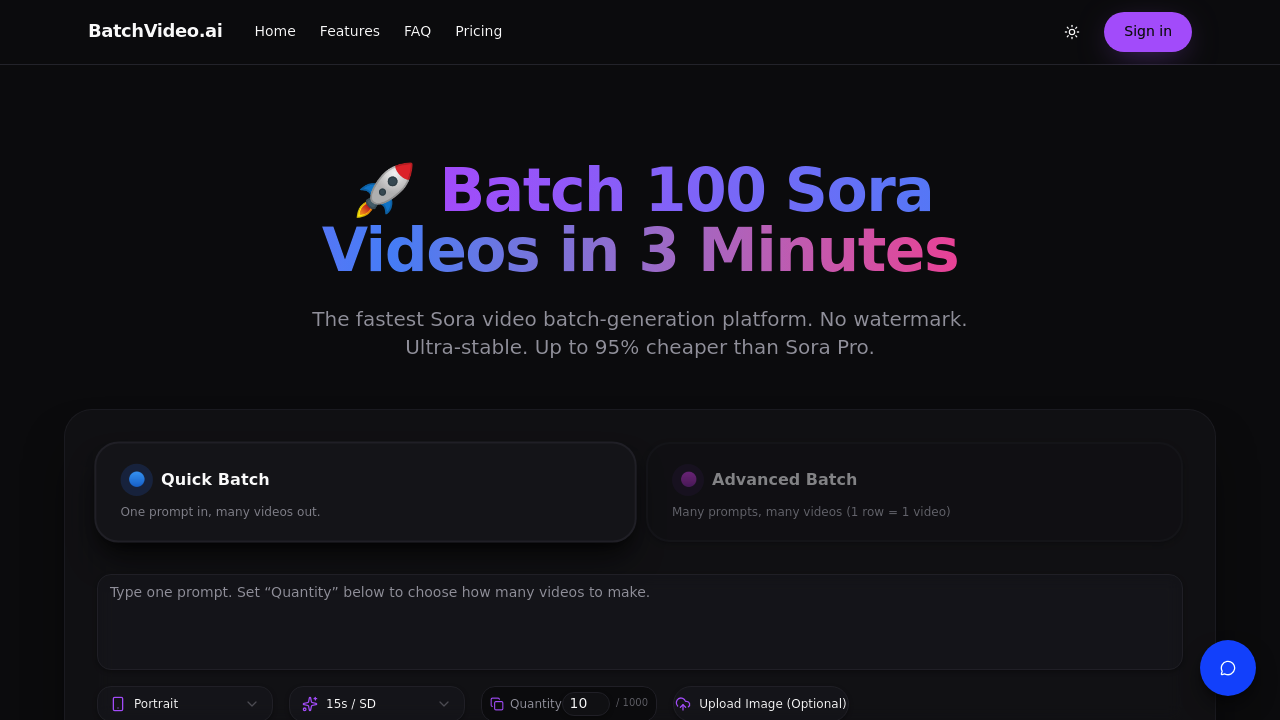
BatchVideo.ai screenshot

Mobile access gets zero mention on BatchVideo.ai's site. That's a problem if you're managing video campaigns on the go. BatchVideo.ai focuses entirely on desktop batch processing for Sora AI videos.

You can generate up to 100 videos simultaneously in about 3 minutes. Two batch modes handle different scenarios. Quick Batch uses one prompt for multiple variations. Advanced Batch processes spreadsheet rows where each becomes a separate video. Social media managers running multi-platform campaigns find this useful when they need dozens of product demos or promotional clips with slight variations.

BatchVideo.ai claims it's up to 95% cheaper than Sora Pro's $200 monthly cost. Failed generations don't eat your credits.

You get full Sora Pro access without OpenAI's waitlist or invitation requirements. Both Standard and Pro model options come included — plus 99.9% uptime stability that most third-party Sora tools can't match. New users start with 100 free credits, enough for 10 Standard videos to test the service.

Pricing kicks off at $15 monthly for the Starter plan with 2,000 credits. That covers up to 200 Standard videos or 10 Pro versions. Creator plan costs $19.50 during their current 50% flash sale, jumping to 8,000 credits. There's no mention of data retention policies or where your video content gets stored, which might concern agencies handling client work. Maximum batch limit of 100 videos could feel restrictive for enterprise-level content production.

Frequently asked

7 questions
How does BatchVideo.ai's spreadsheet processing actually work?
It's pretty straightforward -- the Advanced Batch mode reads your spreadsheet and turns each row into its own video prompt. You just upload your CSV or Excel file, then BatchVideo.ai processes every single row as a separate Sora generation. Works really well for product catalogs where you need videos for different items with their specific descriptions, prices, or features.
Can I really generate 100 videos in 3 minutes with BatchVideo.ai?
Yeah, but that's just the processing time once your batch gets going. The actual generation still depends on how fast Sora is and how complex your batch is. What BatchVideo.ai does is handle the queue management and parallel processing -- so you're not stuck waiting for each video to finish before the next one starts.
What happens if some videos fail during batch processing?
Failed generations won't eat up your credits, so you won't lose money on broken attempts. You'll have to resubmit those failed prompts manually though. BatchVideo.ai doesn't automatically retry failed generations or tell you why specific prompts didn't work.
How much does BatchVideo.ai actually save compared to Sora Pro direct access?
They say up to 95% savings versus Sora Pro's $200 monthly fee. The Starter plan's $15 gets you 2,000 credits -- that's up to 200 videos. Works out to roughly 7.5 cents per Standard video compared to Sora Pro's higher per-generation cost.
Does BatchVideo.ai work on mobile devices?
Nope, no mobile access available. It's desktop-only, which creates problems if you're managing video campaigns while traveling. You'll need a computer to upload batches, monitor progress, or download finished videos.
What's the difference between Standard and Pro models in BatchVideo.ai?
Both Sora model types are included, but Pro videos cost way more credits. The Starter plan's 2,000 credits cover 200 Standard videos but only 10 Pro versions. Pro models typically generate higher quality or longer duration content.
Where does BatchVideo.ai store my generated videos?
The site doesn't specify data retention policies or storage locations. This could be concerning for agencies handling client work -- or businesses with strict data privacy requirements. You'll want to download and backup your videos immediately after generation.

Traffic

Estimated monthly website visits · last 0 months

Not enough historical data for a chart yet.

Reviews (0)

Write review

No reviews yet. Be the first to share your experience.