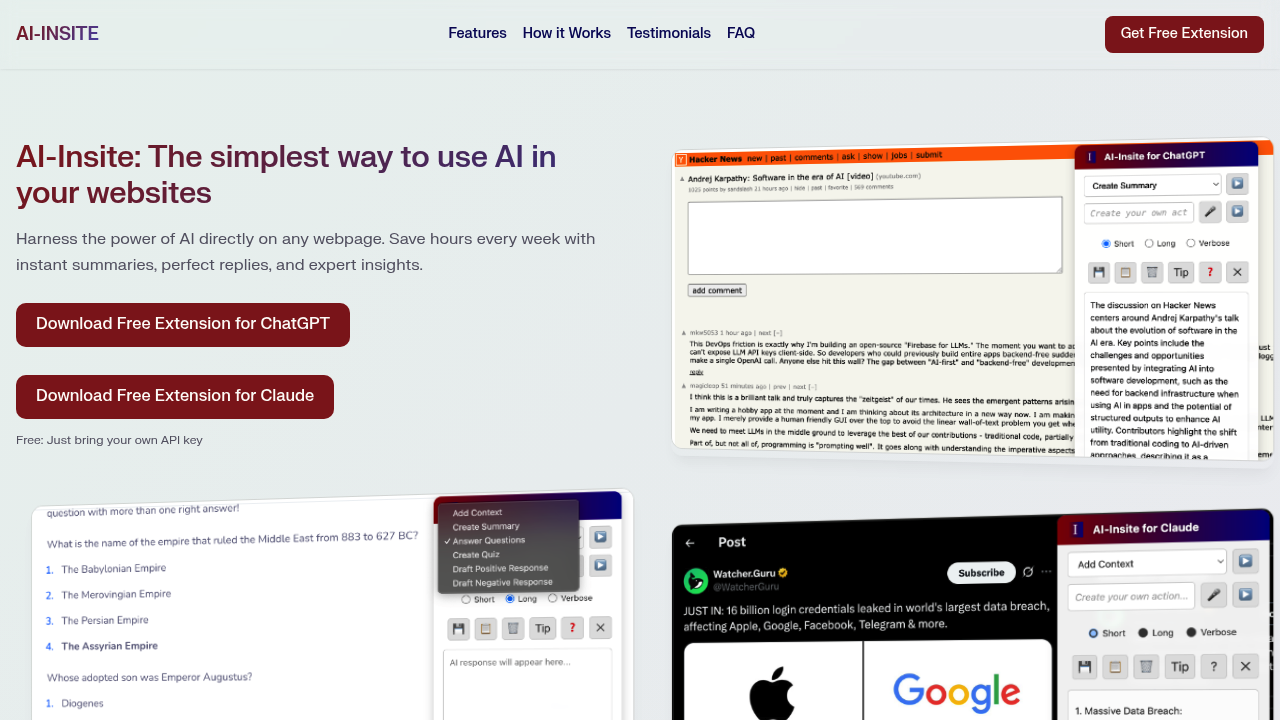
AI-Insite - Bring AI power to any webpage. appears to be discontinued. Its website has been unreachable across our last three checks. See similar tools below for alternatives.
AI-Insite - Bring AI power to any webpage. logo

AI-Insite - Bring AI power to any webpage.

AI-Insite functions as a browser extension that overlays AI capabilities onto whatever webpage you happen to be viewing

Instead of copying text into a separate AI chat interface, you highlight content directly on the page and trigger AI actions through a context menu or keyboard shortcuts. The extension processes that content and returns…

AI-Insite - Bring AI power to any webpage. screenshot

AI-Insite functions as a browser extension that overlays AI capabilities onto whatever webpage you happen to be viewing. Instead of copying text into a separate AI chat interface, you highlight content directly on the page and trigger AI actions through a context menu or keyboard shortcuts. The extension processes that content and returns results in a sidebar without disrupting your current tab.

The core functionality revolves around text manipulation. Highlighting an article activates the Create Summary feature, which condenses the content into main points. One user reported summarizing a 3,000-word technical article in 15 seconds. The Add Context feature works differently by expanding on highlighted topics rather than condensing them, pulling in background information that might not exist on the current page. For emails and messages, the Draft Positive Response and Draft Negative Response features generate professional replies with appropriate tone. The negative response option constructs critical feedback that remains constructive rather than hostile.

The Answer Questions feature scans highlighted content for questions and generates answers based on that material. Create Quiz transforms webpage content into multiple-choice questions with answer keys, useful for study materials or training documentation. The Explain Complex Topics function breaks down technical or dense passages into simpler language. Voice recognition lets users interact hands-free, though the facts do not specify which commands it recognizes. Beyond these presets, custom prompts let users create their own actions tailored to repetitive tasks.

The extension is completely free. No subscription exists. Users need their own API key from either OpenAI or Anthropic to power the AI functions. The extension stores this key in the browser's encrypted sync storage and transmits it directly to the AI provider's servers only when processing requests. The key never routes through SigData.ai's infrastructure. Usage limits depend entirely on the user's API account quotas and billing arrangements with the AI provider, not on AI-Insite itself.

Several technical boundaries exist. The extension cannot run on browser special pages like chrome:// URLs or on PDF files. Sites that restrict content scripts will block the extension's functionality. Since users supply their own API keys, costs accumulate based on API usage rather than a flat subscription rate. Heavy users processing long documents frequently might face higher API bills than occasional users.

Marketing directors, account managers, and software developers represent the primary user base according to the available information. Thousands of professionals currently use this extension. The value proposition centers on speed. The claim suggests users absorb information five times faster compared to reading without AI assistance.

The extension works on any standard webpage where content scripts function properly. Email platforms, news sites, research databases, and documentation pages all qualify as compatible environments. The sidebar delivery method means users don't lose their place or context switch between applications. For professionals who process large volumes of written material daily, the time savings compound. A developer reviewing API documentation can explain unfamiliar concepts instantly. An account manager drafting client responses can generate professional language without starting from a blank page.

The custom prompt feature extends usefulness beyond the presets. Users can build prompts for industry-specific jargon translation, format conversion, or tone adjustment that matches their workflow requirements.

AI-Insite - Bring AI power to any webpage. alternatives

See all →

Frequently asked

7 questions
Do I need to pay for AI-Insite or is it really free?
AI-Insite is completely free with no subscription fees, premium tiers, or hidden costs for the extension itself. The catch is you need to bring your own API key from either OpenAI or Anthropic, which means you pay those companies directly based on your API usage. Your costs depend entirely on how much you use the AI features and what your API provider charges per request. Heavy users who summarize long documents frequently will see higher API bills than someone who occasionally drafts email responses. The extension stores your API key securely in your browser's encrypted sync storage and sends it directly to the AI provider's servers without routing through AI-Insite's infrastructure.
Can AI-Insite work on PDFs and all websites?
AI-Insite cannot run on PDF files or browser special pages like chrome:// URLs. Sites that restrict content scripts will also block the extension from functioning, though the facts don't specify which major sites fall into this category. The extension works on standard webpages where browser extensions have permission to inject scripts, which includes most news sites, email platforms, documentation pages, and research databases. These limitations stem from browser security restrictions rather than deliberate feature exclusions by AI-Insite.
How do I use AI-Insite to summarize articles?
You highlight the text you want summarized directly on the webpage, then trigger the Create Summary action through either the context menu or keyboard shortcuts. The extension processes that highlighted content and displays the condensed version in a sidebar without disrupting your current tab or forcing you to switch applications. One user reported summarizing a 3,000-word technical article in 15 seconds using this method. The sidebar delivery means you can compare the summary against the original text side-by-side, and you can highlight different sections to generate multiple summaries from the same page.
What's the difference between Create Summary and Add Context in AI-Insite?
Create Summary condenses highlighted content into main points, reducing information volume, while Add Context does the opposite by expanding on highlighted topics with additional background information. When you use Add Context, the AI pulls in explanations and details that might not exist on the current webpage, filling knowledge gaps rather than compressing existing text. This makes Add Context useful when you encounter unfamiliar terms or concepts that need elaboration, whereas Create Summary works best when you need to extract key takeaways from lengthy material. Both features work through the same highlight-and-trigger interface but serve opposite information processing needs.
Can AI-Insite draft negative feedback without sounding rude?
The Draft Negative Response feature generates critical feedback that remains constructive rather than hostile, handling the tone balance automatically. This addresses the common workplace challenge of delivering criticism professionally without either sugarcoating problems or sounding aggressive. The extension analyzes the context you've highlighted and constructs responses that identify issues clearly while maintaining professional language. Account managers and professionals who need to push back on proposals or address performance issues can use this to avoid the awkwardness of crafting diplomatic rejection language from scratch.
How does the custom prompt feature work in AI-Insite?
Custom prompts let you create your own AI actions beyond the preset options like Create Summary or Draft Response. You can build prompts tailored to repetitive tasks specific to your industry or workflow, such as translating technical jargon into client-friendly language or converting data into specific report formats. The extension applies these custom prompts to highlighted text the same way it handles the built-in features, through the context menu or keyboard shortcuts. This transforms AI-Insite from a fixed set of tools into a flexible system that adapts to whatever text manipulation tasks you perform regularly.
Who actually uses AI-Insite and what do they use it for?
Marketing directors, account managers, and software developers represent the primary user base, with thousands of professionals currently using the extension according to available data. These users process large volumes of written material daily, from technical documentation and client emails to research reports and API references. Developers use it to explain unfamiliar concepts in documentation instantly, while account managers draft professional client responses without starting from blank pages. The value proposition centers on speed, with claims that users absorb information five times faster compared to reading without AI assistance, which matters most to professionals drowning in information overload.

Traffic

Estimated monthly website visits · last 0 months

Not enough historical data for a chart yet.

Reviews (0)

Write review

No reviews yet. Be the first to share your experience.