
AI Humanizer.work logo

AI Humanizer.work

Landing on AIHumanizer

Work drops you straight into a text box with a 5000 character limit staring back at you. No account walls, no email capture, no trial countdown. You paste AI-generated content into the input area and the interface shows…

AI Humanizer.work screenshot

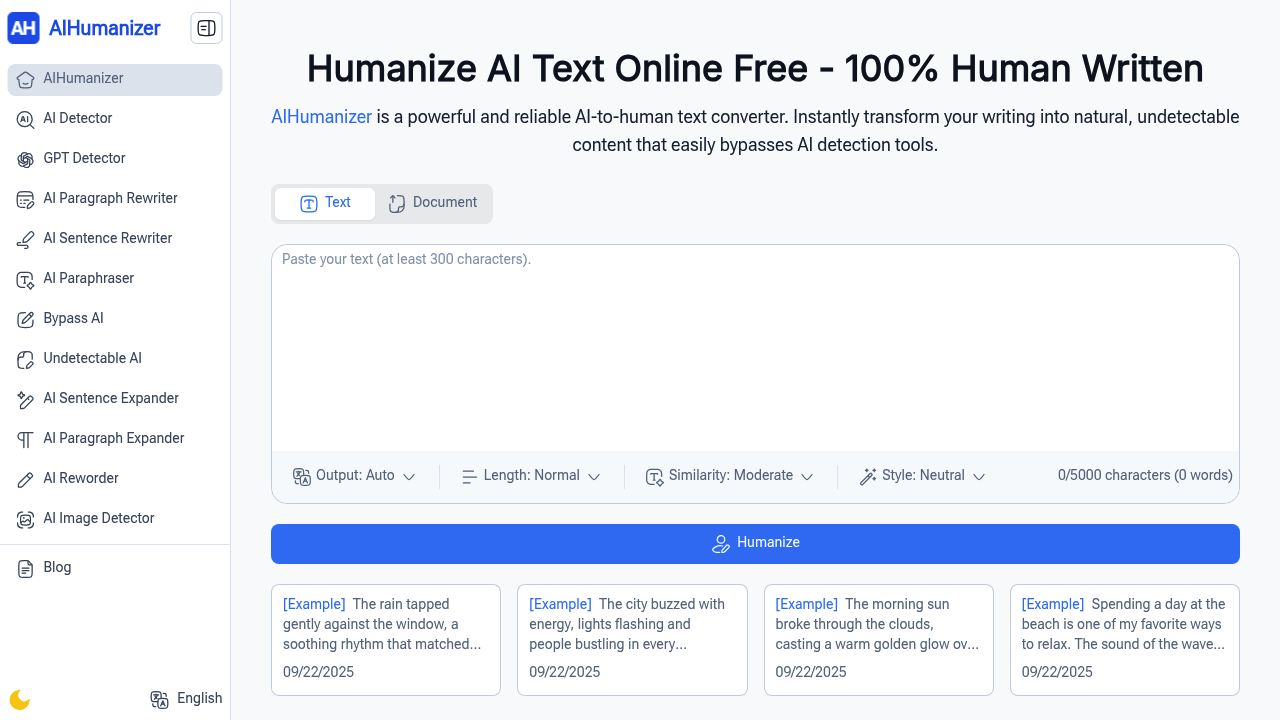
Landing on AIHumanizer.work drops you straight into a text box with a 5000 character limit staring back at you. No account walls, no email capture, no trial countdown. You paste AI-generated content into the input area and the interface shows your character count ticking up in real time.

AIHumanizer offers four control sliders before you hit humanize. Output mode sits on Auto by default. Length control stays at Normal, similarity at Moderate, and style at Neutral. You can crank humanization levels lighter for subtle edits or push them deeper for complete rewrites. The controls feel straightforward but there's no preview of what each adjustment actually does to your text until you run it.

Hit the humanize button and the conversion happens fast. The output appears in seconds with noticeably different sentence structures and word choices. The built-in AI detector check runs automatically on your result, showing whether the rewritten version passes detection tools. This dual function saves you from bouncing between separate platforms.

The friction shows up with longer documents. That 5000 character cap means splitting anything substantial into chunks. You'll copy, paste, humanize, then repeat for the next section. It breaks flow when you're working with research papers or long articles. AIHumanizer handles multiple language styles and tones but switching between them requires manual adjustment each time.

Text mode works for quick pastes but document input mode lets you upload files directly. The interface doesn't make it obvious which formats it accepts, so you might waste time trying different file types. Once content loads though, the same humanization controls apply.

The output customization runs automatically without explaining what it's optimizing for. Sometimes the rewritten text feels natural. Other times word choices seem off or sentences get awkwardly restructured. There's no regenerate button, so if you don't like the result you're adjusting sliders and running it again.

The free unlimited access actually holds up. No surprise paywalls after three uses or hidden premium features. You can humanize as many 5000-character chunks as you need without creating an account. The interface stays the same whether it's your first or fiftieth conversion.

AIHumanizer works best for students cleaning up research drafts or content creators tweaking AI-assisted writing. Professionals handling high-volume content will feel the character limit constantly. It delivers on the core promise of making AI text sound human, but the process stays manual and repetitive for anything beyond short-form content.

AI Humanizer.work alternatives

See all →

Frequently asked

7 questions
Is AI Humanizer completely free?
You get unlimited humanizing with no account required and no hidden paywalls. The tool stays free after your first use, tenth use, or hundredth use. The only constraint is the 5000 character limit per conversion, which means splitting longer documents into chunks. There's no premium tier trying to upsell you and no trial period that expires.
How many characters can you humanize at once?
Each conversion maxes out at 5000 characters. You paste your AI text into the input box and watch the character counter climb until you hit that ceiling. Anything longer requires breaking your content into sections, humanizing each piece separately, then stitching the results back together. The character limit appears immediately when you land on the tool, showing 0/5000 as your starting point.
Does AI Humanizer require sign up?
You land directly on the text input without hitting any registration walls. No email capture, no account creation, no login screen blocking access. You paste content and start humanizing immediately. The tool works the same whether you're a first-time visitor or returning user, with no profile tracking your usage.
Can AI Humanizer handle long documents?
The 5000 character cap makes long documents tedious. You'll copy the first chunk, humanize it, save the output, then repeat for each subsequent section. Research papers, long articles, or full essays require multiple conversion rounds with manual reassembly. The document upload mode accepts files directly but the same character restriction applies, so you're still splitting content into pieces.
What happens if you don't like the humanized output?
The tool doesn't include a regenerate button, so you're adjusting the four control sliders and running another conversion. Output mode, length, similarity, and style controls let you tweak the humanization level from lighter edits to deeper rewrites. Sometimes the rewritten text flows naturally, other times word choices feel off or sentences get restructured awkwardly. You're manually experimenting with slider positions until the output works.
Does AI Humanizer check if the output passes AI detection?
The built-in AI detector runs automatically after each humanization. Your rewritten text gets scanned immediately to show whether it bypasses detection tools. This saves you from copying the output and pasting it into a separate AI checker. The detection results appear right below your humanized content so you know instantly if another pass is needed.
Who actually uses AI Humanizer?
Students cleaning up research drafts use it to make AI-assisted writing sound natural before submission. Content creators tweak AI-generated blog posts or social media copy to add human voice. Professionals who need quick text rewrites for emails or reports find it useful for short-form content. Writers working with high-volume output hit frustration with the character limit since they're constantly splitting and reassembling longer pieces.

Traffic

Estimated monthly website visits · last 0 months

Global rank
#3,633,398

Not enough historical data for a chart yet.

Reviews (0)

Write review

No reviews yet. Be the first to share your experience.