
AI Hair Studio logo

AI Hair Studio

See your new hairstyle before the salon visit

63 views
AI Hair Studio screenshot

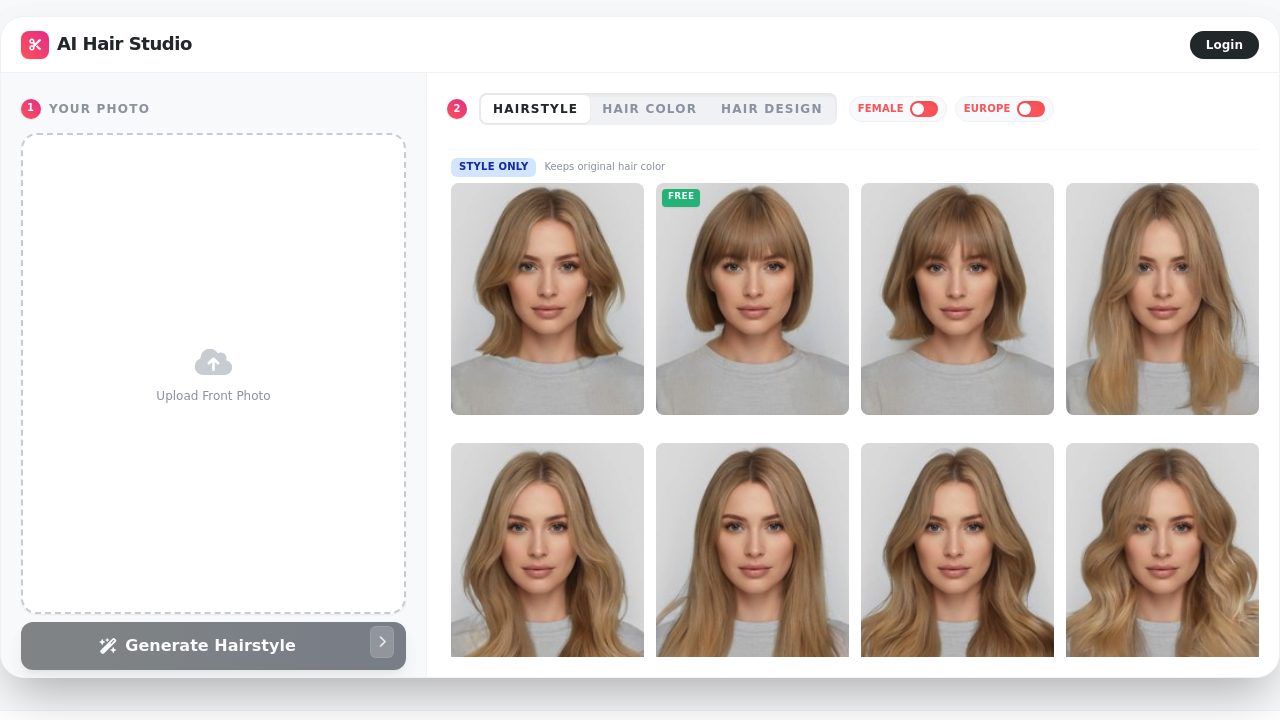
Picking a new hairstyle is like rolling dice with your face. Bad cuts can't be undone. Salon visits cost money. AI Hair Studio solves this by letting you test over 100 hairstyles on your actual photo before committing to anything real.

Upload a photo and it analyzes your face shape — round, oval, square, or heart-shaped. Then it suggests cuts that'll work with your features. The AI creates realistic results instead of slapping cartoon-like overlays on your image.

Say you're a marketing manager with shoulder-length hair eyeing curtain bangs but worried they'll look awful. Try them virtually. Test pixie cuts. Long wavy layers. Even dramatic color changes like silver or dip dye. Results blend naturally with your face.

Men and women can both experiment here.

The color changer covers blonde, brunette, red, and other popular shades. Jack — the solo developer behind this — built something that beats those ancient makeover apps. No downloads needed since it runs in your browser.

Free users get face shape analysis and selected styles, though you'll hit limitations quickly. Premium plans unlock high-definition generation and the full style library, but pricing details aren't posted upfront.

AI Hair Studio won't replace professional consultation entirely. For basic "what-if" exploration though, it delivers what it promises without the usual marketing nonsense.

Frequently asked

7 questions
How accurate is AI Hair Studio's face shape analysis?
The tool spots four main face shapes -- round, oval, square, and heart-shaped. Then it suggests hairstyles that'll work with your features. It's not gonna beat a pro stylist's eye, but it's a pretty solid starting point for trying new looks.
Can I try dramatic hair colors like silver or rainbow shades?
Yep! You get silver, dip dye effects, and other wild colors beyond the basic blonde-brunette-red options. The AI actually blends these colors naturally instead of just slapping fake-looking patches on your photo. Premium users unlock the whole color collection.
What's the difference between free and premium plans in AI Hair Studio?
Free gets you face shape analysis and some hairstyles -- but you'll hit limits fast. Premium opens up HD generation and the complete style library (over 100 options). They don't show exact pricing upfront, so you'll see it during signup.
Do the virtual hairstyles look realistic or cartoonish?
The AI creates realistic results that actually blend with your face and lighting. Way better than those old makeover apps that just stuck obvious cartoon hair on your photo. Quality's good enough to give you a real preview of how you'd look.
How many different hairstyles can I test on AI Hair Studio?
Over 100 different styles covering everything from pixie cuts to long wavy layers and curtain bangs. Works for both men and women. Premium subscribers get the full library -- free users see a smaller selection.
Does AI Hair Studio work on mobile phones or do I need a computer?
It runs in your web browser, so phones, tablets, computers -- whatever you've got works. Jack built it as a web app, so you just upload your photo and start playing around.
Can AI Hair Studio replace getting advice from a professional hairstylist?
Nah, it won't replace professional consultation completely. It's perfect for basic 'what-if' exploration before you commit to a real cut or color change. Think of it as a way to narrow down your options before talking to an actual stylist.

Traffic

Estimated monthly website visits · last 0 months

Not enough historical data for a chart yet.

Data from SimilarWeb · Updated monthly.

Reviews (0)

Write review

No reviews yet. Be the first to share your experience.

Similar tools

See all →