FREE & OPEN SOURCE
Browser Extensions

Free OneTab Alternative — Open Source Tab Manager Extension
TabZip: one click saves all tabs into a restorable list and frees the RAM. No account, no sync server, no tracking — 100% local.
What it is
TabZip is an open-source OneTab alternative for Chrome (and Edge, Brave, Opera — any Chromium browser, Manifest V3). One click on the toolbar icon collapses every tab in the current window into a dated, restorable group on a clean list page — instantly freeing the memory those tabs were eating. Alt+Shift+S does the same from the keyboard.
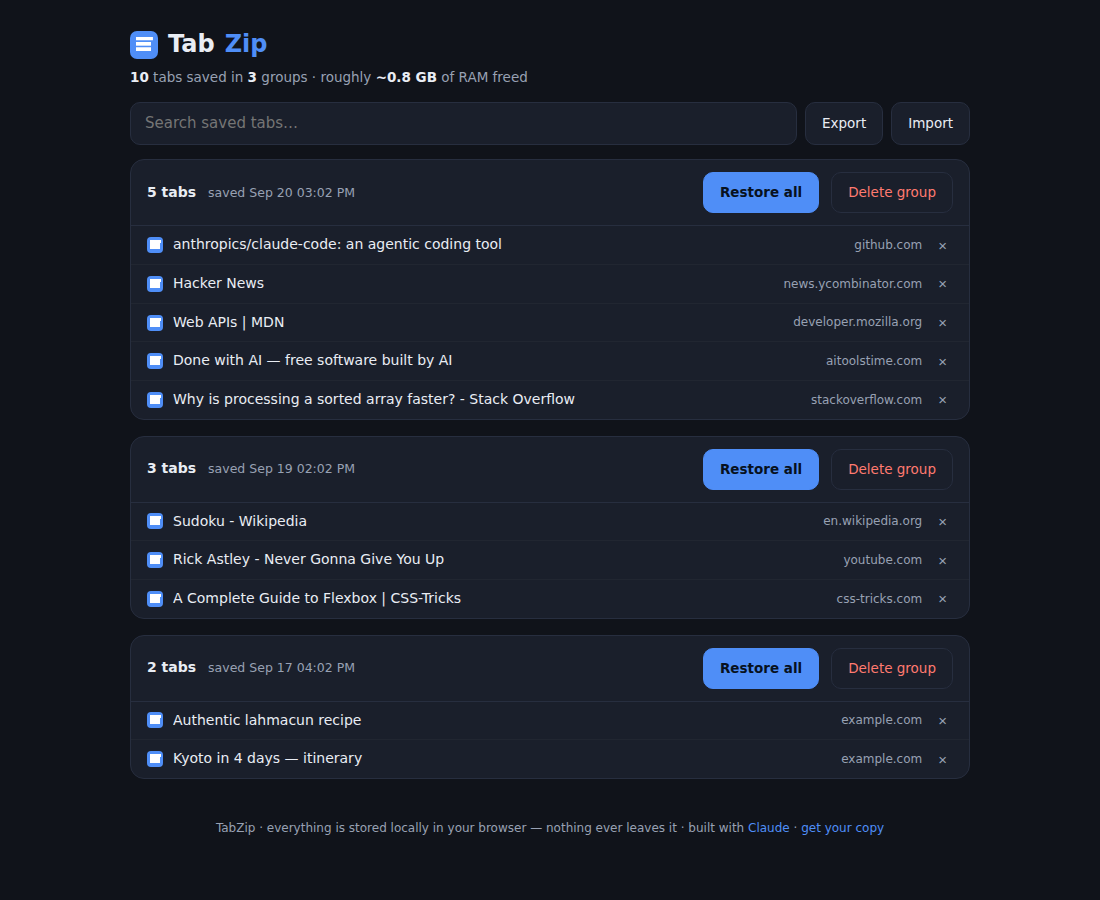
The list page shows your groups newest-first with favicon, title and domain per tab. Click a tab to reopen it (it leaves the list), restore a whole group at once, delete single tabs or groups, and search across everything you've ever saved. A running counter shows total tabs saved and a rough estimate of RAM freed. Export your entire collection as a JSON file and import it on another machine — imports are validated and sanitized.
The privacy angle is the point: unlike most tab managers, TabZip has no account, no sync server, no analytics — the only permissions are tabs, storage and contextMenus, and every byte stays in chrome.storage.local on your machine. Pinned tabs and browser pages are politely left alone.
The list page shows your groups newest-first with favicon, title and domain per tab. Click a tab to reopen it (it leaves the list), restore a whole group at once, delete single tabs or groups, and search across everything you've ever saved. A running counter shows total tabs saved and a rough estimate of RAM freed. Export your entire collection as a JSON file and import it on another machine — imports are validated and sanitized.
The privacy angle is the point: unlike most tab managers, TabZip has no account, no sync server, no analytics — the only permissions are tabs, storage and contextMenus, and every byte stays in chrome.storage.local on your machine. Pinned tabs and browser pages are politely left alone.
Server requirements & dependencies
- Google Chrome, Microsoft Edge, Brave, Opera or any Chromium-based browser with Manifest V3 support
- No account, no server, no build step — the zip is the extension
- Permissions used: tabs (to read/close/reopen), storage (local list), contextMenus (right-click menu)
How to install
1. Unzip the tabzip folder somewhere permanent (the browser loads it from disk).
2. Open chrome://extensions, switch on Developer mode (top-right toggle), click "Load unpacked" and select the tabzip folder.
3. Pin the TabZip icon to the toolbar. Click it — every tab in the window collapses into a group on the TabZip page. Right-click the icon → "Open TabZip list" to browse without saving, or press Alt+Shift+S anywhere.
Your saved tabs live in the browser's local storage; use Export on the list page for backups.
2. Open chrome://extensions, switch on Developer mode (top-right toggle), click "Load unpacked" and select the tabzip folder.
3. Pin the TabZip icon to the toolbar. Click it — every tab in the window collapses into a group on the TabZip page. Right-click the icon → "Open TabZip list" to browse without saving, or press Alt+Shift+S anywhere.
Your saved tabs live in the browser's local storage; use Export on the list page for backups.
The prompt — build it yourself
Paste this into Claude and you'll get this product. This is the actual spec that produced the code above.
Paste this prompt into Claude to build this exact product:
What happened when we ran it: Claude produced the 9-file extension — 255 lines of code plus icons. We tested the list page headlessly with a mocked
Note: the download is the full, unrestricted extension. The prompt is for reproducing (or remixing) the build yourself with your own Claude subscription.
Build a complete Chrome extension called TabZip — an open-source OneTab alternative — using Manifest V3. Files: manifest.json, a background service worker, a list page (tabs.html + tabs.css + tabs.js) and 16/48/128 icons. Permissions: onlytabs,storage,contextMenus. No analytics, no network calls, everything in chrome.storage.local.
Core behavior: clicking the toolbar action (or pressing the Alt+Shift+S command) collects every tab in the current window into a new group — {url, title, favIconUrl} per tab — prepends it to a groups array in storage, closes those tabs, and opens (or focuses and reloads) the list page. Skip pinned tabs, non-http(s) pages and the list page itself. Add a right-click context-menu item on the action icon: "Open TabZip list".List page (dark, calm design: near-black background, blue accent, rounded cards): groups newest-first, each with a header ("N tabs · saved Sep 20 3:02 PM", Restore all, Delete group with confirm) and one row per tab (favicon, title that opens the tab in the background AND removes it from the list, greyed domain, an × remove button). Empty groups auto-disappear. A live search box filters across all groups by title+URL. A stats line shows total tabs, group count and a rough "~X GB of RAM freed" estimate. An empty state explains the shortcut.
Export/import: export the whole collection as pretty-printed JSON; import validates the shape, filters to http(s) URLs, caps title length, sanitizes favicon URLs and merges in front of existing groups, with a friendly error for malformed files.
Code quality: no frameworks, escape everything injected into HTML, async/await throughout. MIT license header in the worker.
What happened when we ran it: Claude produced the 9-file extension — 255 lines of code plus icons. We tested the list page headlessly with a mocked
chrome API and three seeded groups: the stats line computed correctly (10 tabs / 3 groups / ~0.8 GB), search filtered across groups, and restore/remove flows mutated storage as expected. Zero revisions. (Store listing pending — until then it installs unpacked in about 20 seconds.)Note: the download is the full, unrestricted extension. The prompt is for reproducing (or remixing) the build yourself with your own Claude subscription.
Reviews
Used Free OneTab Alternative — Open Source Tab Manager Extension? A star rating takes two seconds and helps others.
More builds
Free Chevereto Alternative — Self-Hosted Image Hosting PHP Script (PixelZip)
Free Slingshot Castle Demolition Game — Single HTML File (Castle Breaker 2D)
Free Vampire Survivors-Style Game — Single HTML File (Neon Swarm Survivor)
Free Suika-Style Planet Merge Game — Single HTML File (Cosmic Merge 2D)
License: MIT — free for personal and commercial use, no warranty. Software is provided as is; review the code before running it in production (it's short enough to actually read).