VIFE logo

VIFE

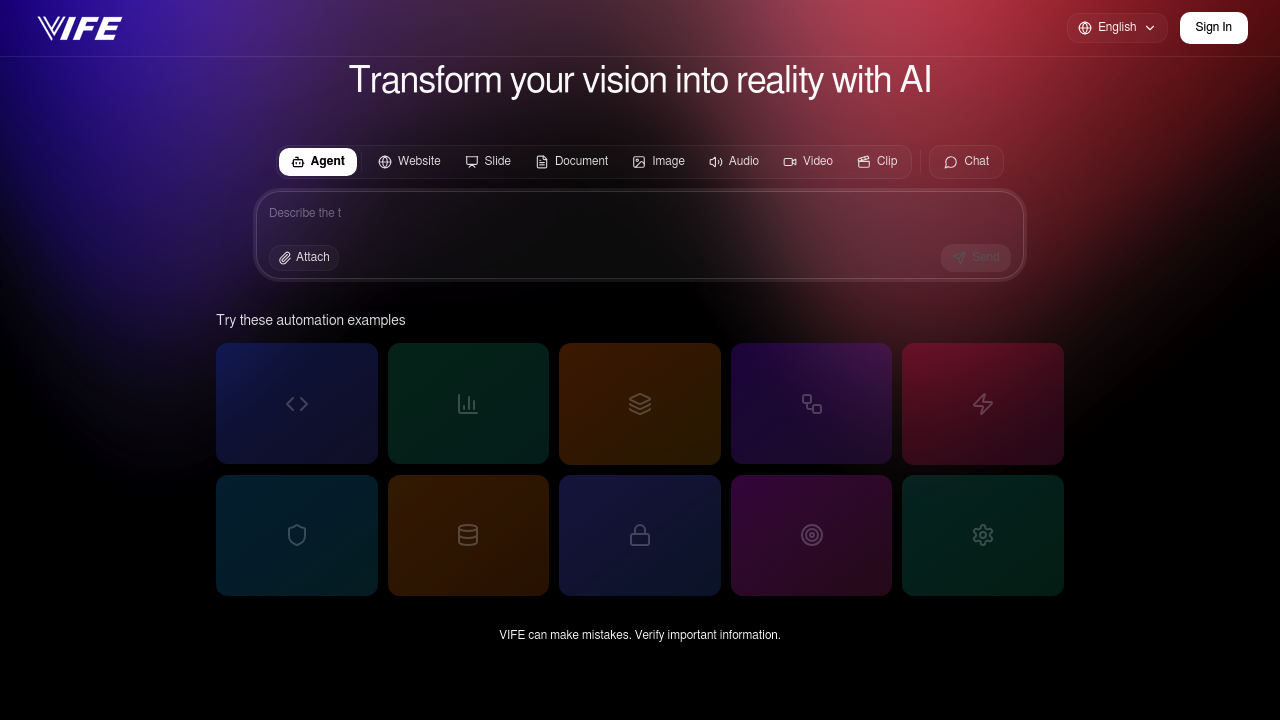
You open VIFE and immediately see a chat interface where you type what you want to build

37 views
Visit vife.ai
VIFE screenshot

You open VIFE and immediately see a chat interface where you type what you want to build. The whole premise is turning your conversation into actual deliverables rather than just getting advice about how to build them.

If you need a landing page, describe it in the chat, maybe attach a mockup file, and it generates the actual website code. It's not giving you instructions or templates—it's building the thing. Same goes for slides, documents, images, audio clips, and video. You talk, it creates.

The automation examples show the range pretty clearly. You can ask it to review a React component and it'll analyze the code. Request a sales data analysis and it processes the numbers. Need microservices architecture for an e-commerce platform? It generates that. Want Stripe checkout integrated? It writes the integration code.

Works for performance optimization too. You can ask it to optimize a Next.js bundle and it'll suggest specific improvements. Submit code with potential memory leaks and it identifies them. Request a social media database schema and it designs one. Security matters? It runs XSS and SQL injection audits on your code.

Testing and deployment fit in there too. It creates tests for payment APIs and sets up GitHub Actions CI/CD workflows. All through conversation.

The chat feels straightforward enough. You type or paste, attach files if needed, and wait for output. But here's where it gets frustrating. VIFE itself warns that it can make mistakes and tells you to verify important information. That's honest but also means you're stuck double-checking everything it generates, especially for critical stuff like security audits or payment integrations.

The file attachment feature helps when you've got existing code or designs to reference. Better than describing everything in text. The Stripe, GitHub Actions, and Next.js integrations suggest it's built for developers working in modern stacks, though the actual depth of these integrations isn't spelled out.

What's unclear is how much back-and-forth you need. Can you describe a complex feature once and get production-ready code? Or does it take multiple rounds of refinement? The automation examples look polished but real projects rarely work that cleanly on the first pass.

The tagline "AI agents that turn conversations into deliverables" captures the pitch well. It's ambitious. You're supposed to go from idea to finished asset without touching design tools or code editors yourself. Whether that actually works for anything beyond simple tasks depends on how much verification and fixing you're willing to do after.

Frequently asked

6 questions
Can I use VIFE for free?
VIFE offers a freemium model, so you can start using it without paying upfront. The available details don't specify what features you get in the free tier versus paid plans, or what the upgrade costs. You'll need to check their actual pricing page to see where the limits hit and what unlocks with payment.
How does VIFE generate code from conversation?
You open the chat interface and describe what you want built—like a Stripe checkout integration or a React component. You can type your request or attach files with existing code or designs to give it context. VIFE then generates the actual code, database schemas, or configurations rather than just explaining how to build them. The catch is it warns you to verify everything since it makes mistakes, so you're reviewing and testing whatever it produces before using it in production.
What can VIFE actually build?
VIFE generates websites, presentation slides, documents, images, audio, video clips, and code through its chat interface. On the development side, it handles React component reviews, sales data analysis, microservices architecture, payment integrations, Next.js optimization, memory leak detection, database schemas, security audits, API testing, and CI/CD workflows. You describe what you need, attach relevant files if you have them, and it creates the deliverable rather than giving you instructions to build it yourself.
Does VIFE integrate with GitHub and Stripe?
VIFE connects with GitHub Actions, Stripe, and Next.js based on its listed integrations. You can ask it to set up GitHub Actions CI/CD workflows or generate Stripe checkout integration code. The tool shows examples of these integrations in action, like creating payment APIs and deployment pipelines. What's not detailed is how deep these integrations go or whether you need to manually connect your accounts.
Is VIFE accurate enough for production code?
VIFE itself tells you it can make mistakes and recommends verifying important information, which is a red flag for production use. You'd get code for things like security audits, payment integrations, or database schemas, but then you're stuck reviewing everything carefully before deploying. For critical features like XSS protection or Stripe payments, that verification step becomes essential rather than optional. It's more of a starting point that needs human oversight than a hands-off code generator.
Who should use VIFE?
Developers and teams working on web applications with modern stacks will get the most from VIFE. It's built for people who need automated code reviews, e-commerce development, payment system integration, performance optimization, security audits, testing, and deployment workflows. The Next.js, Stripe, and GitHub Actions integrations show it's aimed at teams building production web apps rather than hobbyists or non-technical users.

Traffic

Estimated monthly website visits · last 0 months

Not enough historical data for a chart yet.

Data from SimilarWeb · Updated monthly.

Reviews (0)

Write review

No reviews yet. Be the first to share your experience.

Similar tools

See all →