
Jules logo

Jules

An AI coding assistant that works while you sleep sounds like science fiction, but Jules runs continuously in the cloud doing exactly that

It learns your codebase over time and executes coding tasks autonomously without requiring you to sit at your keyboard monitoring progress. The system operates in a secure, isolated virtual machine on Google's…

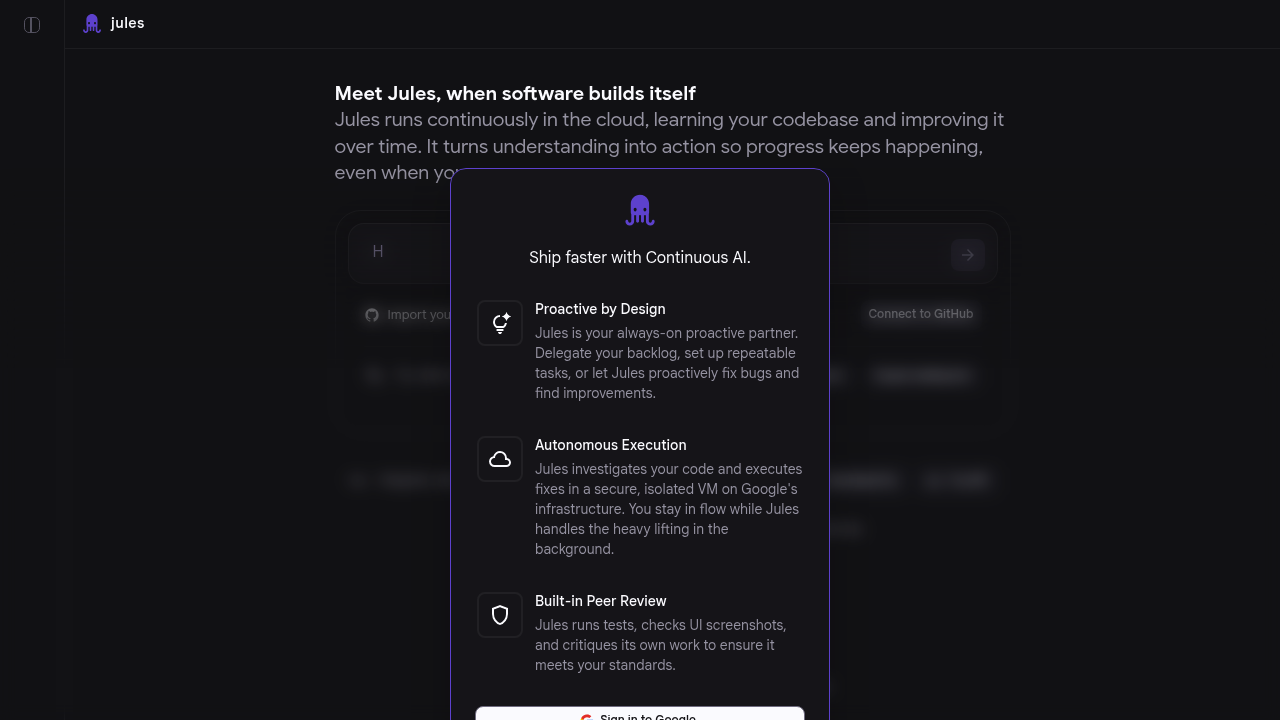
Jules screenshot

An AI coding assistant that works while you sleep sounds like science fiction, but Jules runs continuously in the cloud doing exactly that. It learns your codebase over time and executes coding tasks autonomously without requiring you to sit at your keyboard monitoring progress.

The system operates in a secure, isolated virtual machine on Google's infrastructure. This setup matters because Jules doesn't just suggest code changes like typical assistants. It writes code, runs tests, checks UI screenshots, and submits work independently. That level of autonomy needs serious isolation, which the VM architecture provides.

Jules handles the kind of work developers often save for later. Bug fixes pile up in backlogs. Repeatable tasks get postponed because they're tedious rather than difficult. Code improvements get skipped when deadlines loom. Jules tackles these tasks proactively, working through your backlog while you focus on architecture decisions or new features that require human creativity.

The built-in peer review system sets Jules apart from solutions that just generate code and walk away. Before submitting anything, it runs your test suite and captures UI screenshots to verify nothing broke visually. It also self-critiques its own work, checking for issues before you ever see the changes. This multi-step verification process reduces the chance you'll merge broken code.

Integration happens primarily through GitHub, where Jules can access repositories, create branches, and submit pull requests. Render integration extends its reach into deployment workflows. Sign-in uses Google accounts, keeping authentication straightforward for teams already using Google services.

Developers can interact with Jules through a downloadable CLI or API access. The CLI suits developers who prefer terminal workflows. The API opens possibilities for custom automation or embedding Jules into existing development pipelines.

Jules requires reading its usage guide for optimal results. That's not surprising given its capabilities. Autonomous code execution demands understanding what tasks Jules handles well and how to frame requests effectively. The documentation also warns users to exercise caution with inputs and repositories since Jules has powerful execution capabilities that could cause problems if misused.

Jules targets software developers and development teams drowning in maintenance work. Solo developers gain a tireless assistant handling grunt work. Teams can delegate their entire backlog of minor improvements and let Jules chip away at technical debt overnight.

The system learns your codebase continuously, which means it should get better at suggesting relevant changes the longer it runs. Cost details are not publicly available, so availability information remains unclear. The CLI and API access exist, confirming the product is operational rather than vaporware.


Jules alternatives

See all →

Frequently asked

6 questions
Does Jules work while I'm offline or away from my computer?
Jules runs continuously in the cloud on Google's infrastructure, meaning it operates completely independently of your local machine. You can close your laptop, go home for the day, or take a vacation while Jules keeps working through your backlog. The system executes tasks in a secure, isolated virtual machine that doesn't require any connection to your development environment. This cloud-based architecture lets Jules handle coding tasks overnight or during weekends without any developer intervention.
How does Jules prevent breaking my code when it works autonomously?
Jules includes built-in peer review that runs your test suite and captures UI screenshots before submitting any work. It self-critiques its own code changes, checking for potential issues before creating pull requests. The system operates in an isolated VM to prevent any changes from affecting your production environment until you review and merge them. This multi-layer verification approach means you'll receive pull requests that have already passed automated checks rather than raw code that might break builds.
Is Jules free or does it require a paid subscription?
Pricing information for Jules isn't publicly available in the current documentation. The system offers API access and a downloadable CLI, confirming it's an operational product rather than a concept. Without disclosed pricing tiers or free trial availability, interested developers would need to contact Jules directly or check their official channels for cost details and access options.
What types of coding tasks can Jules handle autonomously?
Jules specializes in bug fixes, code improvements, and repeatable tasks that typically sit in development backlogs. It handles maintenance work proactively rather than requiring explicit instructions for every change. The system tackles tedious tasks that developers often postpone, like fixing minor bugs or applying consistent patterns across a codebase. Jules learns your codebase over time, which helps it identify improvement opportunities and understand your project's conventions without constant guidance.
What are the main limitations or risks of using Jules?
Jules requires reading its usage guide for best results, which means there's a learning curve to using it effectively. The system has powerful execution capabilities that require caution with which inputs you provide and which repositories you grant access to. Since Jules can autonomously write and submit code, developers need to understand how to frame requests properly and monitor what repositories they connect. These aren't dealbreaker limitations, but they demand respect for the tool's autonomous nature and potential impact on your codebase.
Can Jules integrate with my existing development workflow?
Jules integrates primarily through GitHub, where it accesses repositories, creates branches, and submits pull requests like any team member would. Render integration extends its capabilities into deployment workflows for teams using that platform. Developers can interact with Jules through a downloadable CLI for terminal-based workflows or use API access to embed it into custom automation pipelines. Authentication happens through Google accounts, which simplifies access management for teams already using Google services.

Traffic

Estimated monthly website visits · last 8 months

280.8K visits/mo
Monthly visits
280.8K
↓ 27.6% MoM
Global rank
#198,101
IN #51,125
Category rank
#40
AI Coding Assistant
804.2K 673.3K 542.5K 411.7K 280.8K Dec 2025: 804.2K visits Dec 2025 Jan 2026: 742.5K visits Jan 2026 Feb 2026: 525.1K visits Feb 2026 Mar 2026: 315.3K visits Mar 2026 Apr 2026: 476.6K visits Apr 2026 May 2026: 638.7K visits May 2026 Jun 2026: 388.1K visits Jun 2026 Jul 2026: 280.8K visits Jul 2026

Reviews (0)

Write review

No reviews yet. Be the first to share your experience.