
Elasticnote logo
AI Note Taker FREEMIUM from $5/mo

Elasticnote

Opening Elasticnote feels like walking into a note app that couldn't decide what it wanted to be, so it became everything

The interface looks familiar, almost drive-like, with folders and files spread across the left sidebar. But click into a note and things get interesting fast. The block editor handles text smoothly, built on solid…

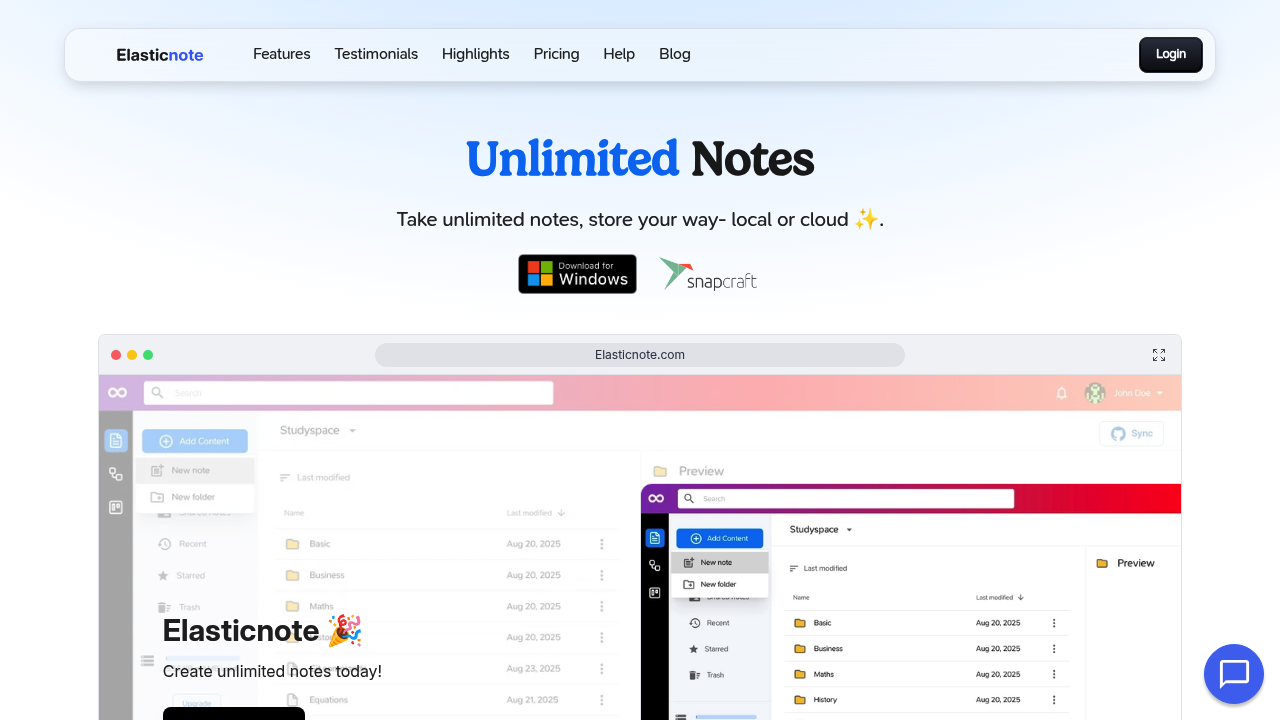
Elasticnote screenshot

Opening Elasticnote feels like walking into a note app that couldn't decide what it wanted to be, so it became everything. The interface looks familiar, almost drive-like, with folders and files spread across the left sidebar. But click into a note and things get interesting fast.

The block editor handles text smoothly, built on solid frameworks that show up in how fluidly paragraphs move and reshape. Drop in markdown and it converts automatically. Add equations, tables, images, checklists, emojis, all the standard stuff works without friction. Syntax highlighting appears when you paste code, which matters if you're documenting technical work.

What sets this apart is where your notes actually live. You can store everything locally on disk, which means your browser becomes the only gatekeeper. No servers, no cloud uploads unless you choose them. For notes that never leave your machine, collaboration obviously won't work. That's the tradeoff.

The GitHub sync changes how version control works for notes. Connect a private repository and your notes push to Git automatically. Every edit becomes a commit. Every change gets tracked. Engineers will recognize this workflow immediately because it mirrors how code already moves through repositories. The core features here stay free forever, including GitHub sync with private repos.

Switch to the Kanban view and the note app transforms into a project board. Tasks move between columns. Todos stack up. It's not trying to be a full project management system, just offering enough structure to organize work without opening another tool.

The diagram builder adds another layer. Wireframe nodes connect with animated edges to map out workflows or system designs. You're basically getting three tools — notes, boards, diagrams — in one workspace.

Where things get messy is in the breadth. Having this many features means more surface area for confusion. The AI writer sits inside notes for enhancement work, but how well it performs depends on what you're asking it to do. Dropbox sync adds another storage option beyond local and GitHub, giving you three ways to handle your files.

Search includes regex capability, which sounds powerful until you realize most people don't think in regular expressions. Tags help organize notes the traditional way, though you'll need to stay disciplined about applying them consistently.

The ability to edit notes with any third-party app matters if you've got a preferred editor. Files sync through Git or other methods, so your workflow doesn't lock into Elasticnote's interface. That flexibility comes at the cost of simplicity. You've got options, but options require decisions.


Elasticnote alternatives

See all →

Frequently asked

7 questions
Can I store my notes locally without uploading to the cloud?
You open Elasticnote and choose local storage during setup, which saves all your notes directly to disk on your machine. Your browser becomes the only thing accessing those files, no server uploads happen unless you explicitly connect GitHub or Dropbox later. This setup means your notes never leave your computer, but the tradeoff is you can't share them for collaboration since they're sitting on your local drive. You'll need a browser to access the local notes feature, it won't work through other methods.
How does GitHub sync work with note-taking?
You connect a private GitHub repository to Elasticnote through the settings, and from that point every note edit automatically pushes as a Git commit. Changes get tracked just like code, with full version history visible in your repository. Engineers will recognize this immediately because it mirrors standard development workflows, except now your notes move through the same pipeline. GitHub sync with private repositories stays free forever, no payment required.
Does Elasticnote have Kanban boards for task management?
You switch from the note view to the Kanban view inside Elasticnote and your workspace transforms into a project board with columns and cards. Tasks move between columns, todos stack up, and you can organize work without jumping to another tool. It's not trying to replace dedicated project management software, just giving you enough structure to plan alongside your notes. The board lives in the same workspace where you're already writing, so context stays connected.
Can I collaborate on notes with my team?
Notes stored in the cloud through GitHub or Dropbox sync let you collaborate and share with others, giving teams access to the same files. Local notes sitting on your disk can't be shared for collaboration, that's the main limitation of choosing local storage. Cloud-synced notes work for team features, but you're trading the privacy of local storage for the ability to work together.
Is Elasticnote free or does it require a subscription?
GitHub sync with private repositories stays free forever, and the essential features don't require payment. You can start using Elasticnote without paying anything, though the available documentation doesn't specify what features might require upgrading later. The core functionality around notes, local storage, and GitHub integration remains accessible without a subscription.
Can I edit my Elasticnote files with other apps?
Your notes sync through Git, Dropbox, or local storage as actual files, which means any third-party editor can open and modify them. You could edit in VS Code, Sublime, or whatever text editor you prefer, then changes sync back through whichever method you've chosen. This flexibility means you're not locked into Elasticnote's interface, but it also adds complexity since you're managing files across multiple tools.
What's the difference between Elasticnote and Notion?
Elasticnote combines notes with Kanban boards and flow diagrams in one workspace, while also offering local storage that keeps files entirely on your machine. Notion stores everything in the cloud and focuses more on databases and team wikis. The GitHub sync with version control works like a developer's workflow, which Notion doesn't offer. Elasticnote positions itself as the only note app merging traditional notes with Kanban and diagrams, though that breadth makes it feel less focused than tools built around a single approach.

Traffic

Estimated monthly website visits · last 0 months

Not enough historical data for a chart yet.

Reviews (0)

Write review

No reviews yet. Be the first to share your experience.