
eBookColoring logo
AI Coloring Book Generator FREEMIUM from $9/mo

eBookColoring

Turning written descriptions into printable coloring pages works through a text-to-image generator built specifically for creating line art suitable for coloring

EBookColoring takes text prompts and produces black-and-white illustrations designed for coloring activities, then lets users compile these individual pages into complete ebooks. The core workflow starts with typing…

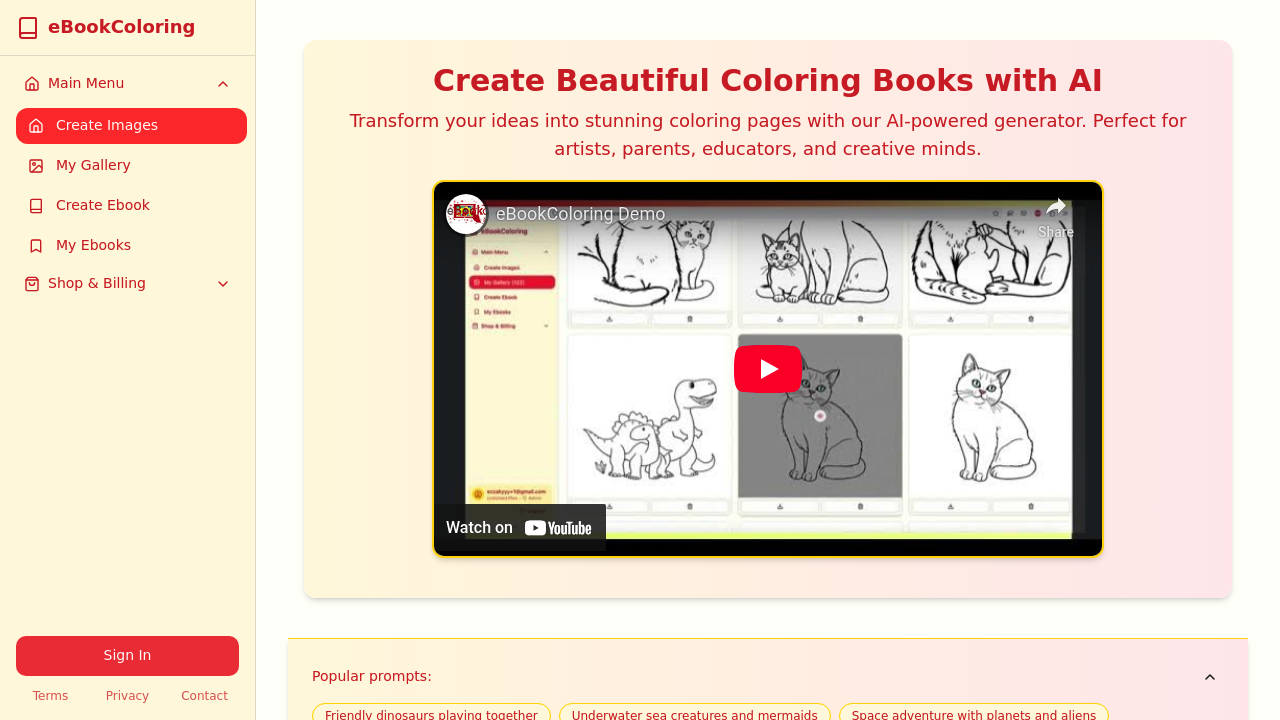
eBookColoring screenshot

Turning written descriptions into printable coloring pages works through a text-to-image generator built specifically for creating line art suitable for coloring. eBookColoring takes text prompts and produces black-and-white illustrations designed for coloring activities, then lets users compile these individual pages into complete ebooks.

The core workflow starts with typing what you want to see. You describe a scene, character, or object, and the AI interprets that description into line art formatted for coloring. The system works on a credit basis where each generation consumes one credit from your account balance. Generated images land in a personal gallery where they're stored for later access. From this gallery, users can select multiple images and bundle them into ebook format, creating complete coloring books from their accumulated pages.

Popular prompt suggestions guide users who aren't sure what to create. The service offers ready-made themes covering dinosaurs, sea creatures, space adventures, fantasy creatures, animals, and mermaids. These suggestions serve as starting points, particularly useful for parents or educators who need quick themed content without brainstorming from scratch. You can use these templates as-is or modify them to fit specific needs.

Priority processing distinguishes premium users from free trial accounts. When multiple requests queue up, paying subscribers get their images generated first. This matters during peak usage times when generation speeds might otherwise slow down. The Unlimited plan includes this priority processing alongside unlimited credit allocation.

Three pricing tiers structure access to the service. The free trial provides 3 credits with basic features and standard support, enough to test the generator and see if output quality matches expectations. The eBookColoring Basic plan costs $9 monthly and includes 100 credits with all features available and priority support. The eBookColoring Unlimited plan runs $20 monthly, removing credit caps entirely while adding premium support and priority processing. Basic plan users who create prolifically will hit that 100-credit ceiling, meaning they'll need to wait for the next billing cycle or upgrade to continue generating pages.

The credit limitation on Basic directly affects how many pages you can produce monthly. A hundred credits translates to a hundred individual coloring pages, which might suffice for casual personal use but could restrict educators building classroom materials or parents creating custom activity books for multiple children. The Unlimited tier removes this constraint entirely, making it the only option for high-volume creation.

Target users span several creative categories. Artists use it to generate base line art they can modify or use as inspiration. Parents create personalized coloring books matching their children's specific interests. Educators build themed activity packets aligned with lesson plans. Anyone needing custom coloring content without drawing skills can produce pages on demand.

The service doesn't connect to external tools or services based on available information. Everything happens within the eBookColoring interface, from generation through gallery management to ebook compilation. No API access appears available for developers wanting to integrate coloring page generation into other applications.

Standard support comes with the free trial, priority support with Basic, and premium support with Unlimited. The distinction between these support levels isn't specified, but typically involves response time differences and access to specialized assistance channels. The free trial's three-credit limit means you'll know quickly whether this tool fits your needs before committing to a paid plan.


eBookColoring alternatives

See all →

Frequently asked

7 questions
How many coloring pages can I create with eBookColoring?
The free trial gives you 3 credits, which means 3 coloring pages total to test the service. The Basic plan at $9 monthly provides 100 credits, translating to 100 individual coloring pages per month before you hit the limit and need to wait for the next billing cycle. The Unlimited plan at $20 monthly removes all credit restrictions, letting you generate as many pages as you want without counting. Each image generation consumes exactly one credit regardless of complexity or how many times you revise your prompt.
Can I turn my generated coloring pages into a complete coloring book?
Generated images save to a personal gallery where you can access everything you've created. From this gallery, you can select multiple coloring pages and compile them into ebook format, essentially building a complete coloring book from your accumulated designs. This feature works across all pricing tiers, so even free trial users can bundle their 3 pages into a mini ebook. The system handles the compilation process within the interface without requiring external software or manual PDF assembly.
Does eBookColoring work for making educational coloring worksheets?
Educators represent one of the primary target audiences since the tool generates custom coloring pages from text descriptions that can align with specific lesson themes. You could create pages featuring historical figures, scientific concepts, geographical landmarks, or any subject matter you can describe in words. The pre-made prompts include themes like dinosaurs, sea creatures, space adventures, and animals that already fit common classroom topics. The 100-credit limit on the Basic plan might restrict teachers who need extensive materials for large classes, making the Unlimited plan at $20 monthly more practical for heavy educational use.
What happens if I run out of credits on the Basic plan?
The Basic plan caps you at 100 credits monthly, and once you've used all of them, you can't generate more coloring pages until your subscription renews the following month. Your only options at that point involve waiting for the reset or upgrading to the Unlimited plan to continue creating immediately. Previously generated images remain accessible in your gallery regardless of credit status, so you won't lose past work. This monthly ceiling makes the Basic plan suitable for casual users but potentially frustrating for anyone creating coloring books with dozens of pages or producing materials for multiple projects simultaneously.
Is there a free version of eBookColoring I can use?
A free trial provides 3 credits with basic features and standard support, giving you enough runway to generate three coloring pages and evaluate output quality. This trial lets you test the AI's interpretation of your prompts and see whether the line art style matches what you need before spending money. After exhausting those 3 credits, you'll need to subscribe to either the $9 Basic plan or $20 Unlimited plan to continue using the service. The free trial doesn't renew or refresh, so it's genuinely a one-time evaluation period rather than an ongoing free tier.
What are the popular prompts in eBookColoring?
The service offers pre-made prompt suggestions covering common coloring book themes that work well for children and general audiences. These ready-made options include dinosaurs, sea creatures, space adventures, fantasy creatures, general animals, and mermaids. You can use these templates exactly as provided or modify them to create variations, which helps when you need quick themed content without brainstorming descriptions from scratch. Parents and educators particularly benefit from these suggestions since they align with popular kids' interests and can jumpstart projects when you're not sure what specific scenes to describe.
Does priority processing really make a difference on the Unlimited plan?
Priority processing moves Unlimited plan subscribers to the front of the generation queue when multiple users submit requests simultaneously. This matters during peak usage times when the AI system handles numerous requests and free or Basic users might experience slower generation speeds. If you're creating coloring pages during off-peak hours with few other users active, the priority processing advantage becomes negligible. The feature becomes most valuable for users generating content on deadlines or during busy periods when waiting in queue would disrupt workflow, particularly relevant for educators preparing materials before class or parents needing pages for upcoming events.

Traffic

Estimated monthly website visits · last 0 months

Not enough historical data for a chart yet.

Reviews (0)

Write review

No reviews yet. Be the first to share your experience.