
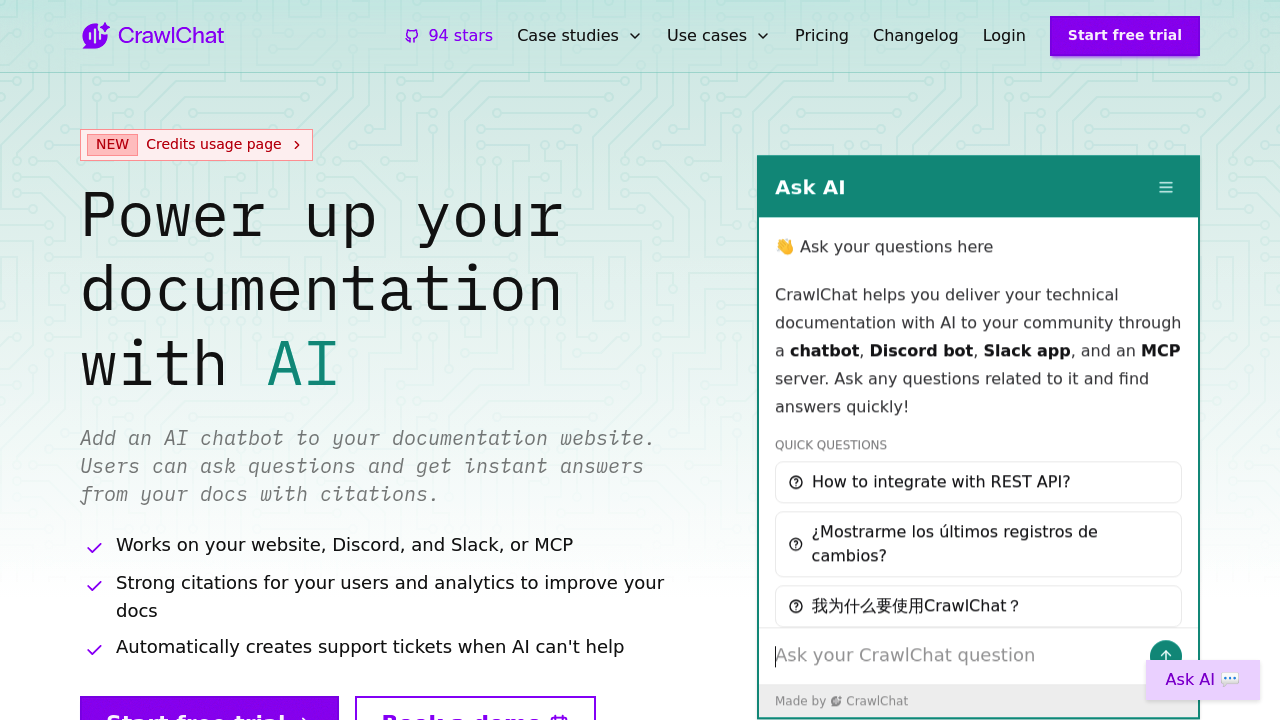
Documentation turns into an AI assistant that answers questions with citations when you add CrawlChat.app to your website. This service builds chatbot widgets that pull answers directly from your technical docs, support materials, and knowledge base content, then displays those answers with specific source references so users can verify information themselves.
The chatbot deploys across multiple channels beyond just your website. It works inside Discord servers where developers hang out, integrates into Slack workspaces for internal team queries, and connects through MCP servers for broader system integration. This multi-channel approach means the same AI assistant trained on your documentation can serve users wherever they ask questions.
When the AI can't answer something, it automatically creates support tickets instead of leaving users stuck. The system recognizes knowledge gaps and prompts users to submit tickets directly from the chat interface, creating a smooth handoff to human support. This automatic escalation prevents the frustration of chatbots that loop endlessly without providing real help.
Analytics track what users ask and where the documentation falls short. The system identifies data gaps by monitoring questions the AI struggles to answer, then surfaces these blind spots so teams know exactly which documentation sections need expansion. Sentiment analysis measures user satisfaction with responses. Categories organize questions into themes, revealing patterns in what confuses users most.
The widget appearance and response tone adjust to match brand guidelines. Teams can modify how the chatbot looks and how it phrases answers, keeping the experience consistent with company voice. Follow-up questions let users dig deeper without starting new conversations.
All three paid plans start with a 14-day trial. The Launch plan costs $29 monthly and handles 2,000 pages of documentation with 800 message credits per month, limited to one collection and one team member. The Grow plan at $69 monthly bumps capacity to 5,000 pages and 2,000 message credits, allowing two collections and two team members. The Accelerate plan runs $229 monthly for 14,000 pages and 7,000 message credits, supporting three collections and five team members.
Message credits represent individual AI responses to user questions. Credits don't carry over to the next billing cycle, so unused credits expire monthly. You can't purchase additional credits unless you're already on a paid plan, which creates a hard ceiling on usage within each tier. The collection limits matter for organizations managing multiple products or documentation sets, since each collection represents a separate knowledge base. Team member restrictions affect larger support organizations that need more people monitoring and managing chatbot interactions.
CrawlChat connects to GitHub Issues, Notion, Confluence, Linear, and n8n for pulling documentation from where teams already maintain it. Hybrid search combines different retrieval methods to find relevant information. Email reports summarize chatbot performance and user interactions. Actions and Compose features extend what the chatbot can do beyond just answering questions. Monitoring covers all messages and conversations across channels with performance scores tracking effectiveness.
Data retention spans one year, giving teams historical context for improving documentation based on past questions. CrawlChat earned 94 stars, indicating early adopter interest from technical teams. Tech companies with developer documentation, SaaS businesses with complex product guides, and development teams supporting technical users fit the target profile. Organizations comparing similar tools look at Kapa.ai, DocsBot.ai, Chatbase, Mava.app, and SiteGPT as alternatives.